Accu-Time Systems, Inc.
Overview
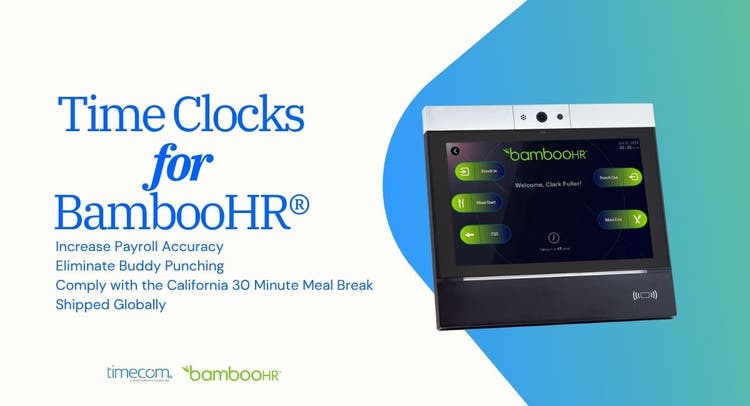
TimeCom for BambooHR is an advanced cloud-based, bi-directional time and data collection solution seamlessly integrated with BambooHR’s time tracking platform.
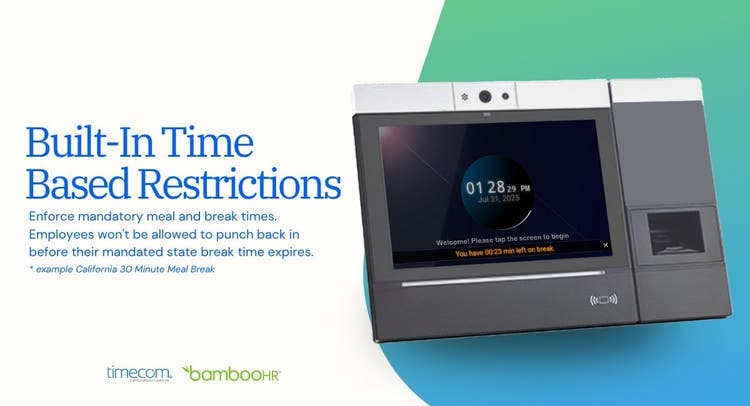
Accu-Time Systems’ TimeCom for BambooHR offers a reliable and secure method of capturing employee work hours directly at the clock and transmitting them to BambooHR in real-time. It eliminates manual time entry, payroll errors, buddy punching, time theft and employee disputes; and ensures compliance with labor laws like California’s 30-minute meal break law. Putting you back in control of your timekeeping process.
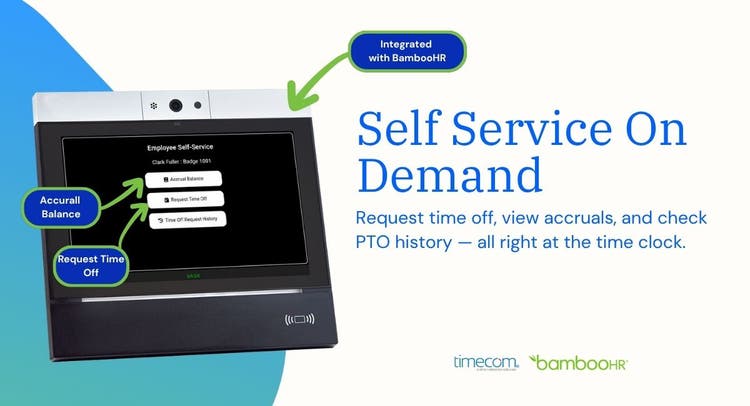
Businesses can choose from facial recognition or fingerprint biometric, or HID ProxPoint badge time clock options. With TimeCom for BambooHR, employees are able to clock in and out, select task transfers, clock in or out for meal breaks, request time off and view accruals.
Seamless Integration, Unparalleled Efficiency
TimeCom doesn't just work alongside BambooHR; it becomes an integral part of your existing system. Imagine the relief of having all your time tracking needs in one place. No more juggling multiple platforms or dealing with compatibility issues!
- Compliance Enforced on the Time Clock
- Stay on the right side of labor laws without breaking a sweat
- Maintain compliance with time-based restrictions like California 30-minute meal break
- Maintain accurate records of employee work hours
- Easily generate reports for audits
- Build trust with your team through transparent timekeeping
Secure Time Clock Options
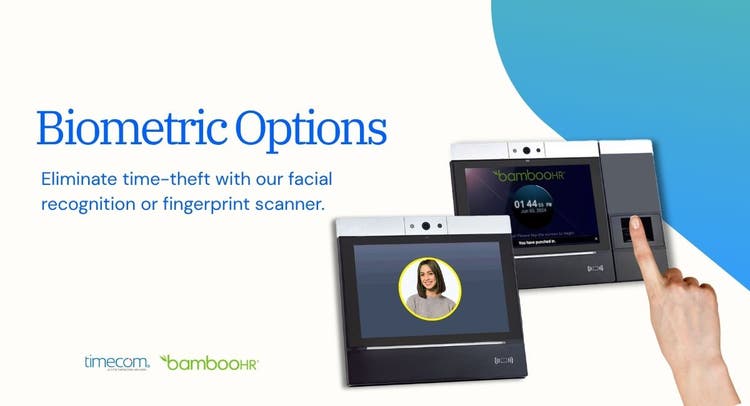
Choose the perfect fit for your workforce—whether it’s facial recognition, fingerprint scanning, or proximity badge verification. Each clock option is durable, secure, and built to keep your payroll accurate with confidence.
The TimeCom Advantage
- Automated Timekeeping: No more manual data entry.
- User-Friendly Interface: Easy for both employees and managers.
- Fraud Prevention: Advanced biometric options (facial recognition, fingerprint scanning).
- Seamless BambooHR Integration: All your HR needs in one place.
- Compliance Support: Stay on the right side of labor laws, TimeCom supports time based restrictions like California 30 Minute Meal Break.
- Clock In & Out with Ease.
- With TimeCom, employees can clock in/out directly on the time clock. No more manual entries, lost data or possibility of payroll bloat.
- Time theft is eliminated: Advanced facial recognition or fingerprint biometric time clocks prevent buddy punching and unauthorized time entries.
Streamlined Payroll, Eliminated Errors
Tired of spending hours reconciling manual entries for payroll? TimeCom for BambooHR automates this process, resulting in:
- Drastically reduced payroll errors
- Significant time savings for your HR team
- Increased employee satisfaction with accurate pay
Integration
How it works.
The integration between BambooHR and TimeCom allows for seamless data synchronization through a bi-directional communication system. TimeCom's ATS cloud services retrieve employee demographic data from BambooHR using the Get Employee web service. Punch Data is sent to TimeCom directly from the time clock devices.
This time clock data is then sent to BambooHR via the Time Tracking Web Services, enabling the time and attendance information to be integrated into the BambooHR Time Tracking platform. The integration is automated and two-way, ensuring that any changes made in either system are automatically synced, keeping the data consistent and up-to-date across both platforms.
Steps to Install.
As Easy As 1-2-3
To ensure secure, accurate, and automated time tracking, you will start by connecting your time tracking platform with TimeCom for BambooHR through the Accu-Time Systems portal. It only requires you to sign on to both an Accu-Time Systems Portal and Your BambooHR account. That’s it! The process is straightforward and automated and can be completed in three simple steps:
Activate and log in to the Accu-Time Systems Portal:
To activate your Accu-Time Systems Portal account, click on the email link you received from Accu-Time Systems. Use your email address to log in into your new Accu-Time Portal account. Once in, you will be prompted to create a password. If you have not received your portal credentials, please reach out to customercare@accu-time.com
Navigate to the BambooHR Section:
After logging into the Accu-Time Portal, go to the "BambooHR" section. Click on the BambooHR logo tile and log in to your BambooHR account using your BambooHR credentials.
Generate and Use the API Key:
Once your BambooHR credentials are entered, an API Key will be generated and the connection between both systems will be automatically created. The API key is used to connect TimeCom with your BambooHR Time Tracking Platform. Upon successful connection, you will see the following message: “You have successfully integrated the Portal to your BambooHR services”
Congratulations! You have successfully connected Accu-Time Systems’ TimeCom for BambooHR time tracking solution to your platform. An Accu-Time Systems Customer Care representative will contact you shortly to finalize the connection and ensure all employee demographic information is accurately and seamlessly synching from your BambooHR platform to the time clock.
What data syncs?
Publisher
Accu-Time Systems
Updated: 10/08/2024
Phone Support:
1-877-212-6922
Email Support:
Support Hours:
8:30 am to 5:00 pm EST