AirMason
Discount Packaging
New to AirMason? Schedule and attend a personalized product demo and receive a $50 gift card as our thank-you.
See how AirMason helps HR teams simplify handbook maintenance, keep policies compliant, and create beautiful digital handbooks that employees actually use. With seamless BambooHR integration and automated workflows, getting started is faster and easier than ever.
Book your demo today to explore how AirMason can modernize your employee experience from day one.
Overview
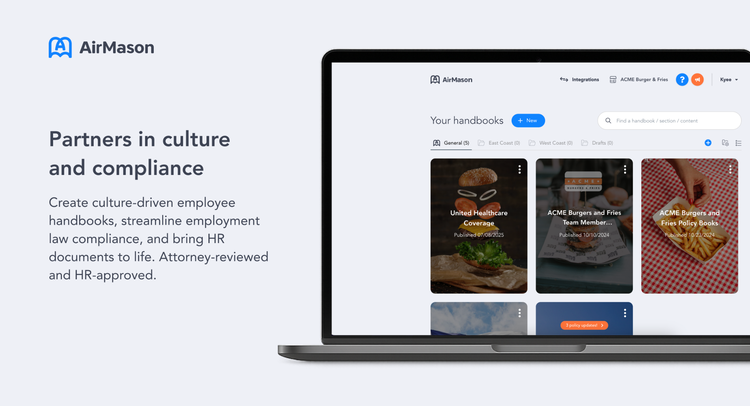
Create culture-driven employee handbooks, streamline employment law compliance, and bring HR documents to life, with AirMason's digital document hosting and AI-powered workflows.
AirMason is the all-in-one platform for creating, managing, and maintaining digital employee handbooks and HR policies – scaling with your culture while keeping you fully compliant.
Via seamless BambooHR integration, AirMason automates welcome emails, auto-permissions documents (by location, team, department and more), and turns HR compliance into employee experience. Employees see only the documents relevant to them – better yet, always the most up-to-date, accurate versions.
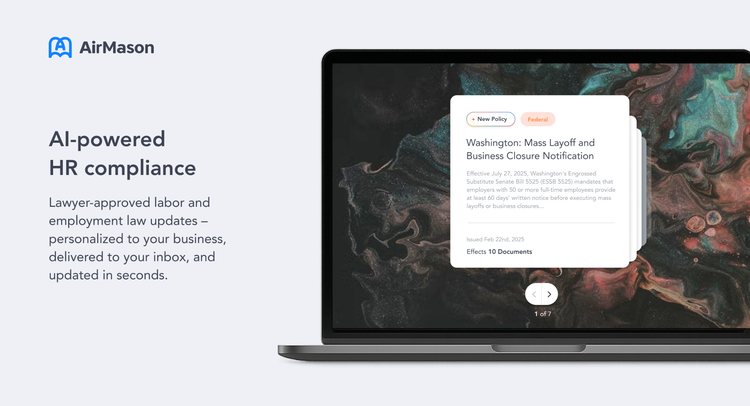
AirMason’s AI-powered compliance engine monitors Federal and State employment law changes daily, working alongside their in-house HR legal team to keep your documents current. And with AirAssist, the intelligent AI assistant, employees receive real-time, personalized and compliant answers to HR and policy questions, reducing the burden on HR teams while improving clarity for all.
Build beautiful HR documents with expert-backed templates and tools
From their extensive HR template library to version tracking, e-signatures, and audit trails, AirMason helps you manage HR documents with confidence. And, with their intuitive hosting and design platform, you can create, update, and share policies fast – without compromising on compliance accuracy or design quality.
AI-powered compliance for updated policies in minutes, not days
No more wading through irrelevant legislation or deciphering legalese; leveraging AI alongside real-life, qualified humans, AirMason delivers employment law updates – in plain, digestible language your employees will understand – based on your industry, headcount, location, and other company-specific context. In just a few clicks, legislation updates are added to your handbook and ready to distribute to the employees who need them.
Less time answering questions = more time for strategic work
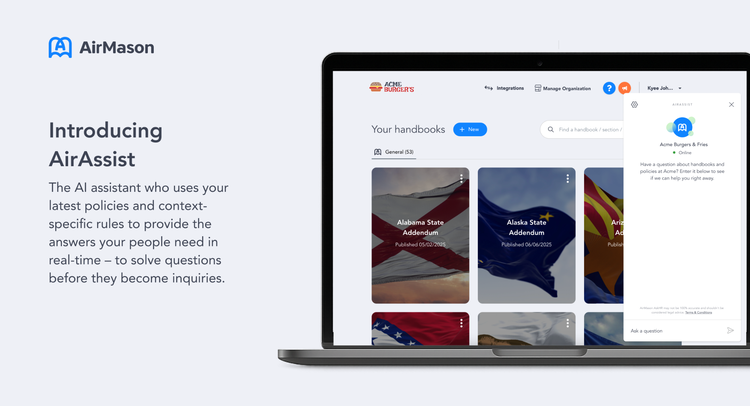
AirAssist delivers policy-backed answers in real-time, personalized to each employee’s profile – so your team gets instant clarity without the wait. Via integration with Bamboo, AirAssist knows who employees are, the information they need, and where to find it, meaning questions answered here-and-now (and fewer for your team to solve later). HR can step in at any time with full visibility, control, and the ability to review and adjust every answer.
Branded, interactive document libraries which evolve as your team does
AirMason’s intuitive design platform offers customizable themes (with full font and color control), interactive pre-built templates, and a user-friendly interface – so anyone can create stunning, on-brand documents in minutes. Every document on AirMason is mobile-friendly and searchable, with extended accessibility features to ensure all employees have the info they need.
Integration
How it works
Sync your employee list between AirMason and BambooHR, with custom workflows which enable employees to access their personalized document library seamlessly from day one. Create custom access rules (based on criteria such as location, employment type, department, and more) to ensure each employee receives only the documents relevant to them. Automate timed reminders to chase down outstanding signatures.
How to Install:
Connecting BambooHR to AirMason:
- Log in to your AirMason Admin account (admin.airmason.com)
- At the top of your screen, click Integrations.
- Scroll to find BambooHR and click Connect.
- Enter your BambooHR subdomain.
- Click Connect to BambooHR.
- You’ll be redirected to the BambooHR login page – log in and allow access.
- Once authorized, you’ll be redirected back to AirMason to confirm and select your organization.
- Your integration is now connected. Click Manage Organization in the top right of your AirMason dashboard to view your current employee list.
To Install Bamboo SSO
- Go to your BambooHR Admin platform
- Find Company Links and click manage
- Add a category called AirMason SSO
- Add a link, name it AirMason Employee (Link: https://{{AirMason Employee portal}}/sso/bamboo/)
- Click Save
- Now your SSO is all set up
How to Use:
Integrating AirMason with BambooHR automates employee list syncing, so new joiners/leavers are processed daily. Based on custom access rules, set up with the AirMason Integrations team during onboarding, employees will automatically receive their personalized library of documents based on their Bamboo profile information (e.g. location, team/department, etc). Upon initial setup and testing completion, the integration is fully automated and hands-off.
What data syncs?
Publisher
AirMason
Published: 10/03/2025
Phone Support
+1 (646) 918-8673
Email Support:
hello@airmason.com or reach out via Intercom live chat on admin.airmason.com
Support Hours:
24 / 7