Anuvi COBRA
Overview
Most TPA’s treat COBRA as just another product line—sending snail mail, requiring support tickets, and leaving your clients frustrated. Anuvi is different. We've built the only platform that focuses exclusively on modernizing the COBRA experience for brokers, employers, and terminated employees.
Here's what makes Anuvi stand out: 96% of new groups are fully operational within one day of contract signature. No implementation fees. No monthly minimums. No hidden costs. Just transparent, simple pricing starting at $1 PEPM that scales with your book of business.
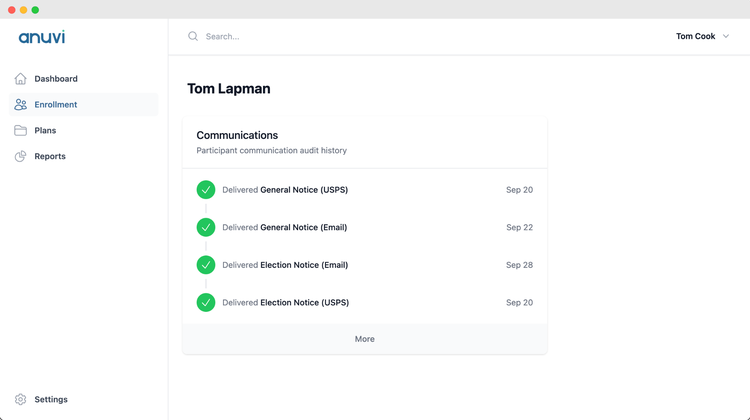
But speed is just the beginning. Anuvi delivers next-day electronic notifications, mobile-first enrollment and payment interfaces, and verified carrier enrollments—all backed by dedicated account managers who actually answer when you call. Your clients get a modern COBRA dashboard with full audit trails, while their employees experience a seamless, mobile-friendly process that feels nothing like traditional COBRA.
The real game-changer? Our Offboarding Concierge and Decision Support features. COBRA enrollees utilize healthcare services at 290% higher rates than other employees, creating significant cost exposure for self-funded and level-funded plans. Anuvi connects terminated employees with benefits advisors at key touchpoints—helping them explore ACA alternatives when appropriate. Early pilots show we deflect 25% of potential COBRA participants to more affordable individual coverage, protecting your clients' renewal rates and bottom line.
We're trusted by over 6,000 employers via our partnerships with leading agencies including Hub, Mercer, and OneDigital, and most importantly – UBA partner firms
Suite of Administrative Tools & Seamless Integration
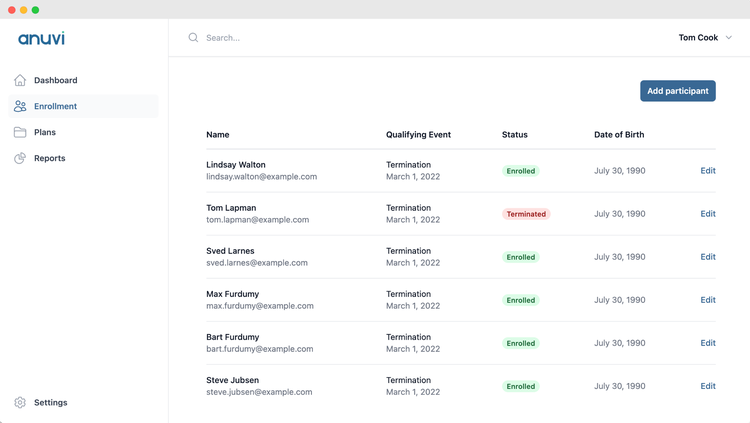
No more spreadsheets. Keep track of enrollment status, payment status, and carrier reinstatement status directly in the Anuvi portal, with all critical data being fed via the Bamboo API connection.
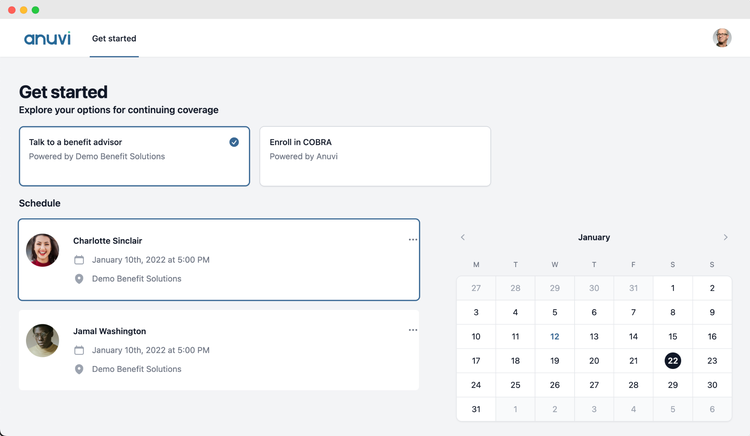
COBRA Decision Support
Anuvi connects terminated employees with qualified benefits advisors to help employees navigate alternatives to COBRA, driving down plan risk.
Dedicated Account Management
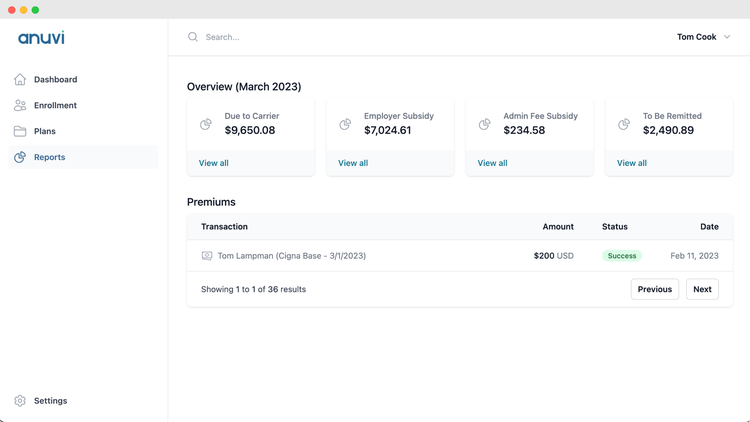
Leverage our dedicated account management team and our real-time reporting platform to stay informed, avoid time-consuming COBRA issues, and protect your brand.
Mobile-first enrollments and payments interfaces.
Qualified beneficiaries can manage their entire COBRA enrollment from their phone, including enrollment, and premium payments.
Key Differentiators:
Account Management: Direct email/phone access to your Anuvi Account management team. We respond the same day to most inquiries, and are happy to hop on the phone/zoom whenever necessary
Offboarding Decision Support: Help participants evaluate ACA plans side by side to COBRA options, shifting risk off of your clients' plans.
No hidden fees: Comprehensive COBRA admin for a simple PEPM rate -- no hidden fees or minimums
Confirm Carrier Changes: Anuvi confirms all COBRA adds, modifies and deletes with carriers, ensuring that COBRA participants are enrolled in a timely manner
Less Paperwork: Through our integrations with ben admins like BambooHR -- say goodbye to large renewal spreadsheets that are due 60 days in advance. We onboard/renew groups in 1-3 business days, and grab most of the data we need directly from your ben admin system of choice.
Better Together Story:
Anuvi's deep API integration with Bamboo combined with our best in class proprietary platform & service allows you to stay focused on your business, instead of debugging file feeds & COBRA issues.
Integration
How it works
Realize “set it and forget it” COBRA compliance via the Anuvi and BambooHR integration. Anuvi will manage all aspects of COBRA compliance for you, reducing manual effort and ensuring accurate, automated processing. Keep your BambooHR system and Anuvi COBRA administration in sync as we help you track COBRA qualifying events, manage COBRA carrier enrollments, and handle COBRA premium collections and reimbursements.
Automated Data Sync & COBRA Notifications
Seamless Employee Data Import – When a new employee is enrolled in employer-provided, COBRA-regulated benefits (e.g., Medical, Dental, Vision, Healthcare FSA, HSA, HRA), Anuvi automatically pulls their BambooHR records into its system on a nightly basis. This creates an employee profile, generates and sends the COBRA Initial Rights Notice, ensuring timely compliance.
Automated COBRA Qualifying Event Processing – If an existing employee with COBRA-eligible benefits experiences a qualifying event (e.g., employment termination, transition from full-time to part-time), Anuvi pulls the necessary COBRA-related data from BambooHR and sends a COBRA election notice. Anuvi ensures events are processed timely & correctly – we’ll reach out to you if we need any additional clarifications.
Anuvi COBRA Administration Portal
Real-Time Enrollment & Payment Tracking – COBRA elections, premium payments, and participant status updates are all available in your Anuvi portal. Real time access to all aspects of COBRA compliance.
Reduced Manual Work – No need for duplicate data entry—Anuvi syncs employee status changes directly from BambooHR to keep records up to date.
Service
Dedicated Account Management - Direct email/phone access to your Anuvi Account management team. We respond the same day to most inquiries, and are happy to hop on the phone/zoom whenever necessary. We have the best client retention rate in the country.
COBRA Claims Risk Management - Anuvi helps participants evaluate ACA plans side by side to COBRA options, shifting risk off of your clients' plans. By ensuring your former participants have access to all federal and state programs, our clients see an average election rate of ~5%, which is half the industry average. Since COBRA enrollees typically have claims costs 3x higher than average, this program drives substantial ROI.
How to Install:
1. Submit a request from the BambooHR Marketplace
From the Anuvi COBRA listing in the BambooHR Marketplace, click Request Information and submit the short interest form. Once received, Anuvi will reach out with pricing & contracting Information. Anuvi has no hidden fees whatsoever.
2. Connect Anuvi with your Insurance Broker
If you’re ready to sign up, introduce Anuvi to your broker and we’ll work with them to get an application for new business submitted on your behalf.
3. Sign Our Contract
After your broker submits the new business application you’ll receive a contract for e-signature. Once you sign that, your portal will be available in 1-3 business days.
4. Authenticate with Bamboo
Log into Anuvi, visit My Tasks page, and click Connect Bamboo to kick off your initial data sync & setup the connection going forward.
5. Final Details
Ensure all your Anuvi “tasks” are complete (takes 5-10 minutes) – then you’re all set
What data syncs?
Publisher
Anuvi
Integration Published: 04/01/2026
Integration Updated: 04/01/2026
Phone Support:
(888) 519-6788
Email Support:
ops@anuvi.io
Support Hours:
9am to 5pm MT