Employee Navigator
Overview
Managing benefits and payroll across separate, disconnected systems creates administrative hassle, costly errors, and compliance risk. Payroll admins are left manually re-entering benefit deductions in two places, and demographic changes made in one system don't automatically show up in the other, leading to eligibility gaps, inaccurate payroll, and time-consuming corrections.
The Employee Navigator integration solves this by connecting Employee Navigator, an external benefits administration platform, directly with BambooHR. Employee demographic data syncs automatically between both systems, so Employee Navigator always has the information it needs to manage benefit eligibility. For BambooHR Payroll customers, the integration goes further: benefit deduction data set up in Employee Navigator flows directly into BambooHR payroll runs, keeping payroll deductions aligned with what's actually been elected.
With Employee Navigator connected to BambooHR, you get a single, accurate source of truth for employee and benefits data. This eliminates double entry, reduces payroll errors, and gives admins full visibility into every synced deduction.
Keep Employee Data in Sync
Eliminate manual data entry and reduce errors by automatically syncing employee demographic data between BambooHR and Employee Navigator. When you update key fields or add new employees in BambooHR, those changes are reflected in Employee Navigator, so eligibility and benefit administration always run on accurate data.
- First/Middle/Last Name
- Social Security Number
- Gender
- Birth Date
- Address
- Home/Mobile/Work Phone
- Home/Work Email
- Hire Date
- Termination Date
- Employment Status
- Job Title
- Pay Type
- Salary / Pay Rate
- Employer Identification Number
- Division
- Department
- Location
Easy Setup & Activation
Turn on the integration yourself, no support ticket required. Account Owners can enable the integration from Settings > Apps, choose whether to sync demographic data only or demographic and payroll data together, and configure deduction codes to map benefit plans in Employee Navigator to deductions in BambooHR.
Run Payroll with Confidence
Keep payroll deductions aligned with benefit elections. Once benefit deduction data is set up in Employee Navigator, it flows directly into BambooHR payroll runs, supporting accurate payroll and reducing time-consuming corrections.
See Deductions in One Place
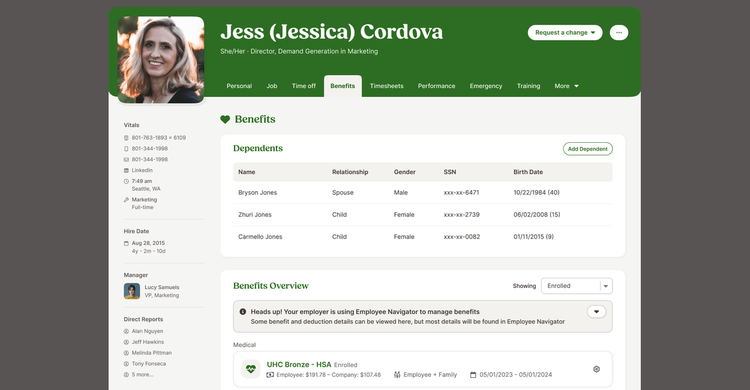
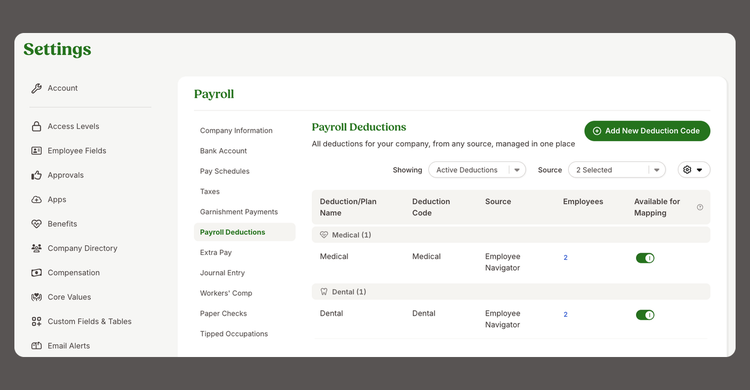
Get a consolidated view of every synced deduction. Use a dedicated page and the Employee Navigator Deductions Report to search and review each employee's plans, deduction amounts, employer contributions, frequencies, and effective dates.
Integration
How It Works
The Employee Navigator integration connects BambooHR with Employee Navigator to keep employee data and benefit deductions in sync, so nothing has to be entered twice.
Getting connected
An Account Owner turns on the integration from Settings > Apps in BambooHR. During setup, they choose what to sync: employee demographic data only, or demographic data along with payroll deductions. If payroll is included, the admin sets up deduction codes in BambooHR that map to benefit plans in Employee Navigator. From there, the admin connects the two accounts by logging into BambooHR from Employee Navigator and granting access to the needed data.
What gets shared
Once connected, employee demographic data (like name, address, contact info, hire date, and employment status) syncs automatically between BambooHR and Employee Navigator. This keeps eligibility information accurate on both sides without any manual updates.
Payroll deductions, handled automatically
For BambooHR Payroll customers, the integration goes a step further. Benefit deductions set up in Employee Navigator flow directly into BambooHR payroll runs, using the deduction codes configured during setup. Admins can review all synced deductions anytime from Payroll Settings or the Employee Navigator Deductions Report, which shows each employee's plans, deduction amounts, employer contributions, frequency, and effective dates.
How To Install
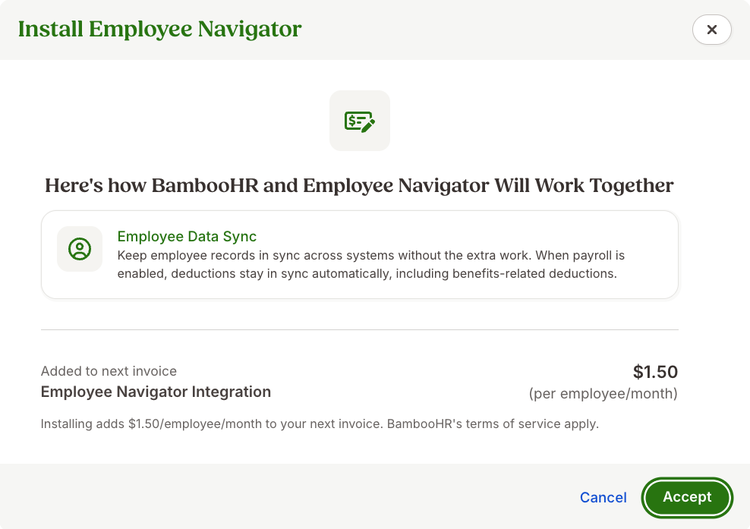
The Employee Navigator integration is a self-service setup that Account Owners can turn on directly from BambooHR, no support ticket required.
To get started, go to Settings > Apps in BambooHR and select Employee Navigator. Choose whether to sync employee demographic data only, or demographic data along with payroll deductions, and agree to the integration terms.
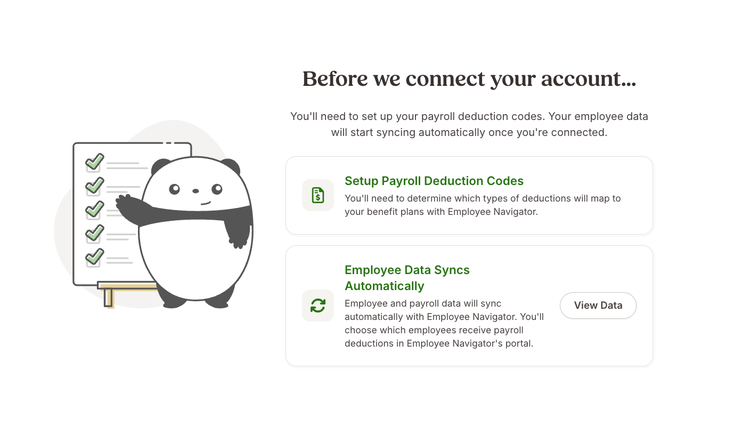
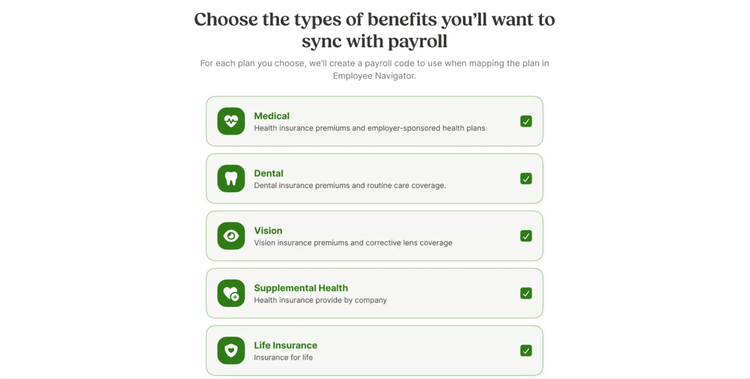
If you're syncing payroll deductions, you'll be prompted to set up deduction codes in BambooHR. These codes are used to name each deduction, set its tax treatment, and (for pre-tax medical plans) mark whether it's reportable. Once your codes are set up, you can download a report of them to reference when mapping benefit plans in Employee Navigator.
Next, you'll connect your BambooHR and Employee Navigator accounts. From Employee Navigator, select BambooHR, log in with your BambooHR credentials, and grant access to the data needed for the sync (employee demographic information, and payroll deduction data if selected).
If your company already manages active benefit plans in BambooHR, setup includes one additional step: mapping your current benefit deductions to their Employee Navigator equivalents. A downloadable report of your existing codes is available to help with this mapping. Once Employee Navigator deductions begin flowing into BambooHR, you'll be prompted to end the corresponding plans and enrollments in BambooHR, since they'll now be managed in Employee Navigator.
What data syncs?
Publisher
BambooHR
Integration Published: 10/1/2026
Integration Updated: 10/1/2026
For Broker Questions:
en_brokerrequest@bamboohr.com
For General Support:
support@bamboohr.com
Phone Support:
(866) 387-9595
Support Hours:
Monday - Friday, 6:00am to 5:00pm Pacific Time / 9:00am to 8:00pm Eastern Time