Multiplier
Overview
Multiplier is a global employment platform that helps businesses hire, pay, and manage talent across 160+ countries. The BambooHR integration connects your HRIS with Multiplier's global employment infrastructure, allowing workforce data to flow automatically between both platforms.
Global Payroll – Run compliant payroll for your international entities with automated synchronization of employee, compensation, time-off, timesheet, and payroll data.
Global Workforce Sync
Automatically synchronize employee and contractor records between BambooHR and Multiplier for Global Payroll.
Automated Onboarding & Lifecycle Management
Automatically create employee records, activate contracts, synchronize updates, and keep onboarding and offboarding aligned across both systems.
Payroll-Ready Data Synchronization
Keep compensation, time-off, and payslips synchronized where supported to improve payroll accuracy and reduce manual administration.
Flexible API-Powered Integration
Support bi-directional data flow, configurable sync frequencies, and custom fields, helping BambooHR remain your central HR system.
Key Differentiators
Unlike point integrations that focus only on employee profile sync, Multiplier connects BambooHR to a complete global employment platform.
Through a single integration while maintaining one accurate workforce record. The integration supports multiple synchronization models—including real-time, configurable, and bi-directional sync—allowing organizations to automate HR and payroll processes without changing how they work in BambooHR.
Better Together Story
BambooHR is where HR teams manage their people. Multiplier is where global employment happens.
Together, they create a connected experience for managing a distributed workforce. HR teams continue working in BambooHR while Multiplier handles compliant hiring, payroll, and global employment infrastructure. Employee and contractor information flows automatically between systems, eliminating duplicate work, improving payroll accuracy, and ensuring every stage of the employee lifecycle—from onboarding to offboarding—is reflected across both platforms.
The result is a centralized, reliable, and scalable way to manage global teams without relying on spreadsheets or manual data reconciliation.
Integration
How it Works
Multiplier integrates with BambooHR via secure APIs to automate employee and contractor data synchronization. Depending on your workforce model, data flows in real time, on a configurable schedule, or bi-directionally across Employer of Record, Global Payroll, Contractor of Record, and Freelancer workflows. Employee records, compensation, time-off, payslips, and lifecycle updates stay synchronized, reducing manual work and keeping HR and payroll aligned.
How to Install
Prerequisites
Before connecting the two platforms, you'll need a BambooHR API key and your BambooHR subdomain. Both are generated by your BambooHR admin: log into BambooHR, open the Profile icon, go to API Keys, and either use an existing key or generate a new one, then save it somewhere accessible. Your subdomain is the prefix from your BambooHR login URL (e.g., "acme" from acme.bamboohr.com).
Steps to Install
- Set location and job titles in BambooHR. Under BambooHR's Settings → Employee Fields, confirm the Location field matches your Multiplier entity setup, and add any Job Titles your team uses. Both need to be in place before syncing starts, or employee profiles will fail to sync correctly.
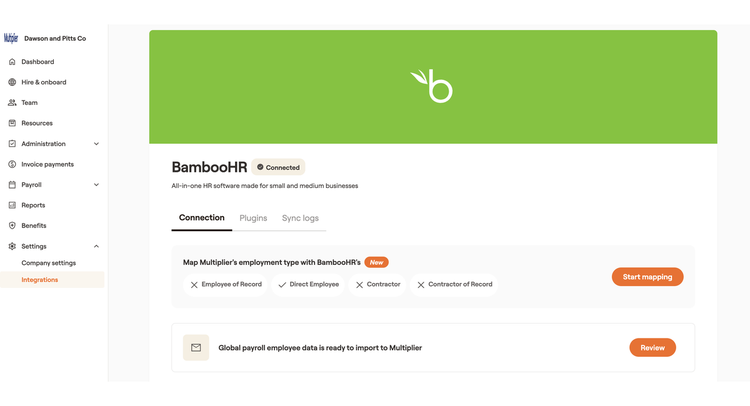
- Connect BambooHR to Multiplier. In Multiplier, go to Settings → Integrations → App Directory, select BambooHR, and click Connect. Enter your subdomain and API key, then submit to complete the connection.
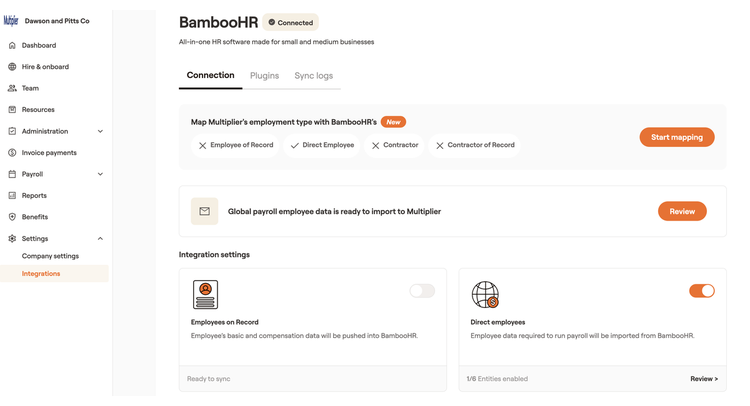
- Enable EOR Data Sync. From Settings → Integrations → Connected tab → BambooHR, turn on the EOR employee data sync toggle. Employees must already be activated in Multiplier for their profiles to sync — once enabled, all active EOR employees begin flowing into BambooHR's People tab (allow a few minutes for the initial sync).
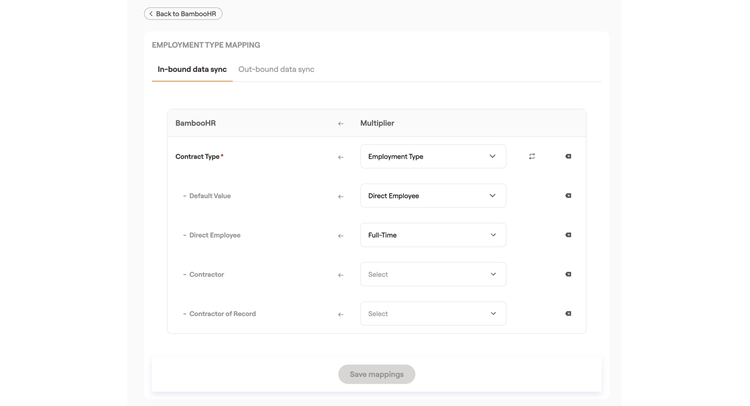
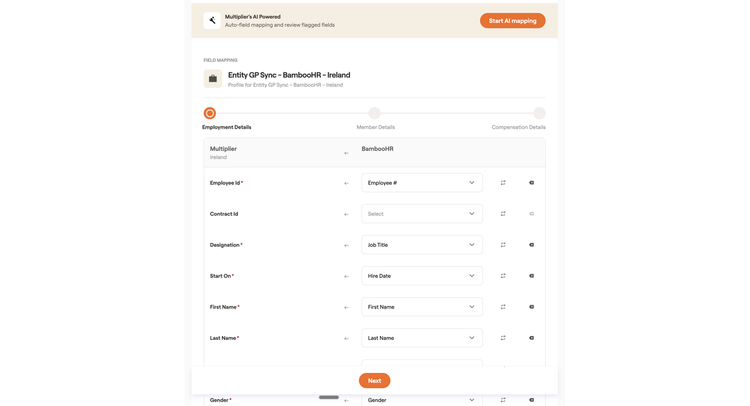
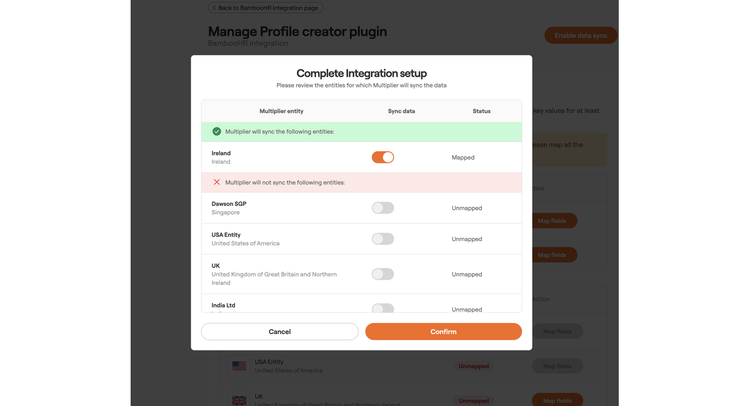
- Enable Global Payroll Data Sync. From the same connected BambooHR panel, turn on the Global Payroll sync toggle and confirm. This requires at least one Multiplier entity to be fully mapped first. Once live, employees listed in BambooHR's People tab start appearing under Multiplier's Team section.
- Configure Payslip Sync. In BambooHR, set up a payslip folder under My Info → Documents (use an existing folder, upload one, or create a custom one). Then in Multiplier, go to Settings → Integrations → your BambooHR connection → Plugins tab, and enable Payslips — published payslips will now deliver automatically to BambooHR.
- Configure Time Off Sync. Make sure leave policies already exist in BambooHR. In Multiplier, go to Settings → Company Settings → Company Policies → Time Off Policies, use the Leave Mapping tool to match BambooHR leave types to Multiplier's, then enable Time Off Sync — approved leave will import automatically and employee leave balances will update on their own.
What data syncs?
Publisher
Multiplier
Integration Published: 07/29/2026
Integration Updated: 07/29/2026
Email Support:
support@usemultiplier.com
Support Hours:
24/7