Overview
The BambooHR + NetSuite integration simplifies payroll accounting by sending journal entries and syncing payroll data seamlessly with NetSuite. Reduce manual data entry, minimize errors, and ensure accurate financial reporting. With customizable memo line mapping, asynchronous data transfer, and secure authentication, this integration helps streamline payroll reconciliation and expense tracking, saving time and improving accuracy.
Automated Data Sharing
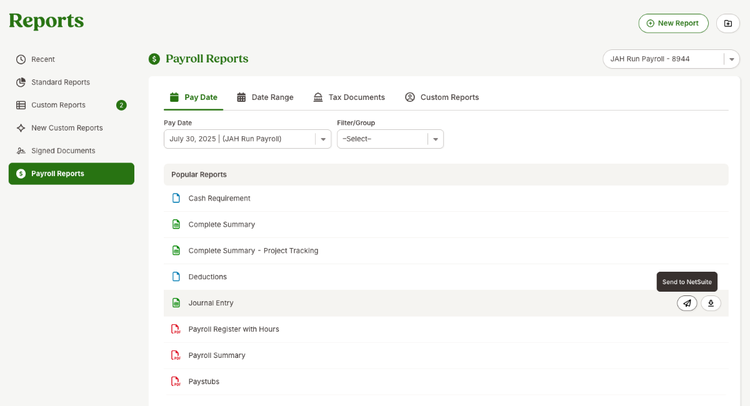
You can now send your payroll Journal Entry (JE) reports directly from BambooHR to NetSuite with a click of a button, saving time and reducing errors associated with manual data entry.
Easy Setup and Installation
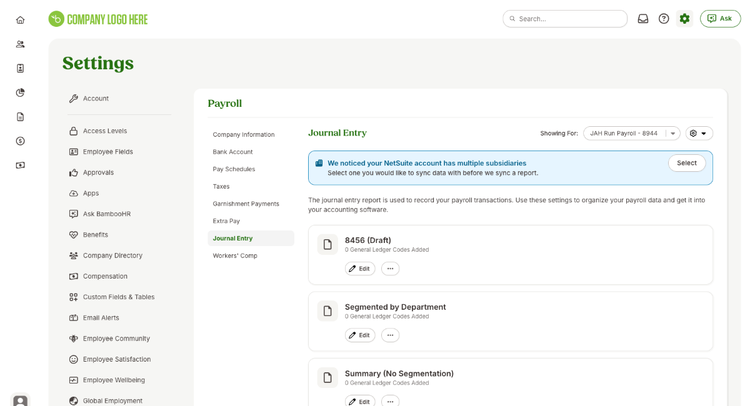
Account owners in BambooHR can easily install the "NetSuite (General Ledger)" app from the BambooHR Apps page in Settings and connect their payroll data to NetSuite through a simple authentication process.
Enhanced Data Mapping
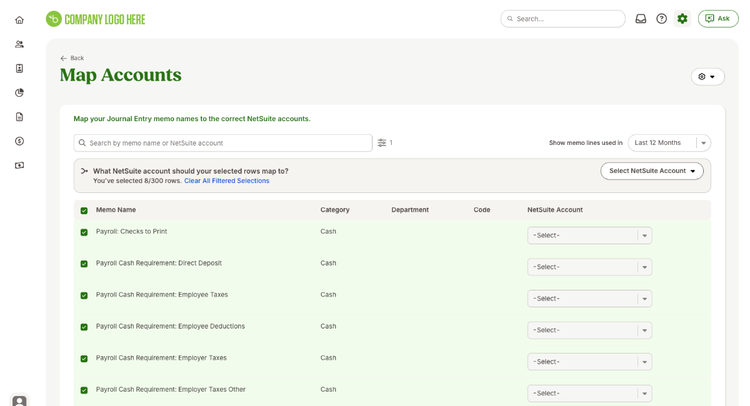
You can map your payroll categories, such as wages and deductions, to your NetSuite Chart of Accounts through bulk editing, ensuring accurate financial reporting. Smart filtering and search functionality have also been updated to help you quickly find and map the correct accounts.
Integration
How To Install
View our Help Article here!
If you need additional help, please contact our Payroll Support team.
Before purchasing the NetSuite integration, confirm that:
- You use Journal Entry Reports, not custom GL reporting.
- You need no more than 2 dimensions per memo line.
- The integration does not support:
- Custom GL formatting
- Multi-segment splitting beyond what's available in JE Reports
- Any mapping logic outside what JE supports
- If you need advanced segmentation or formatting (learn more here), you will need a Paid Custom GL report.
What data syncs?
Publisher
BambooHR
Updated: 10/10/2025
Phone Support:
866-872-9123
Email Support:
payrollhelp@bamboohr.com
Payroll Support Hours:
5:00 am - 5:00 pm Pacific Time
Monday - Friday