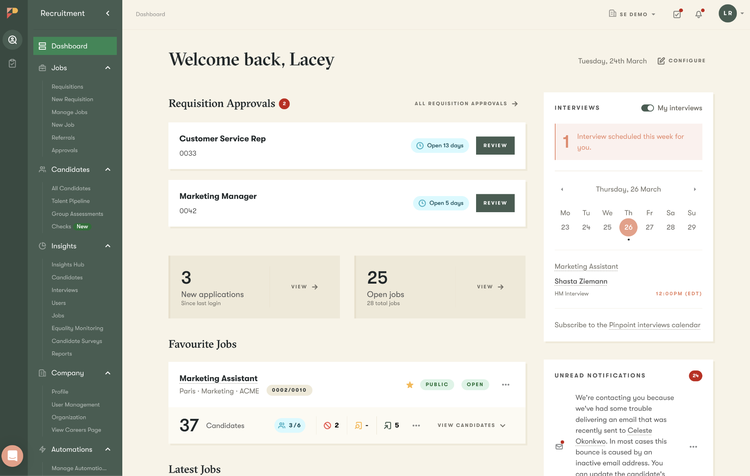
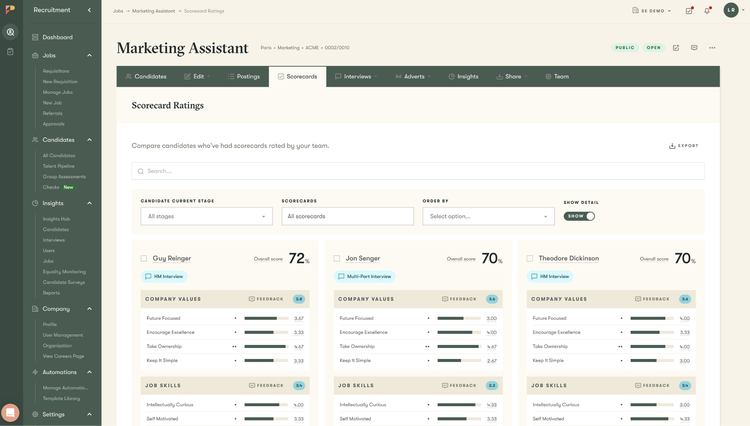
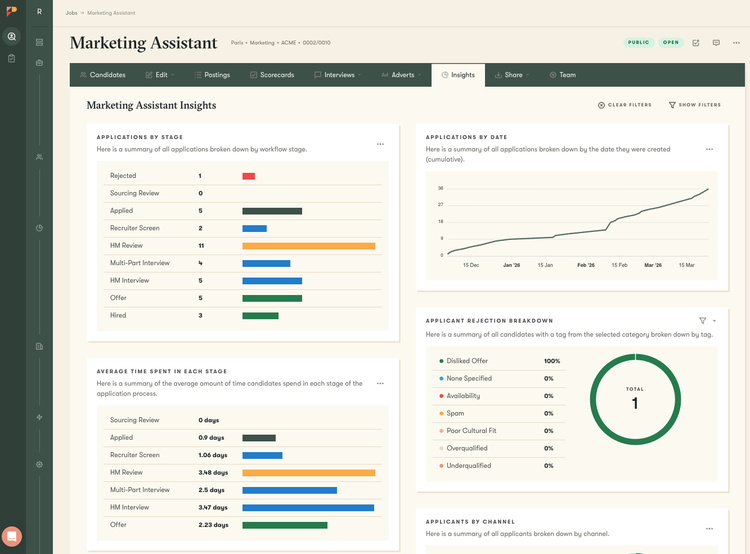
Pinpoint is the ATS for multi-stream hiring. One platform runs every kind of hire your team has on its plate, from high-volume to executive search.
Whether you're recruiting across cities or countries, hiring desk-based and frontline workers, or running early-career hiring alongside specialist search, Pinpoint adapts to how each part of your business hires.
AI and automation power your hiring, so your team can focus on people. You'll get the flexibility, control, and ease of use to run consistent, high-quality hiring across the organization, without slowing anyone down or adding hurdles for recruiters, hiring managers, or candidates.
Create and adapt workflows for different roles, teams, and regions without workarounds or engineering support.
Control, designed for scale and compliance
Set the permissions, approvals, and automations that keep hiring consistent and auditable as you grow.
Ease of use for every role
Give recruiters, hiring managers, leadership, and candidates an experience that feels intuitive from day one.
Pinpoint supports every stage of hiring, from planning to onboarding, in one connected platform:
Plan: Understand demand and align hiring with business goals
Attract: Reach the right candidates across channels, regions, and roles
Engage: Build and nurture talent pipelines over time
Select: Run structured, flexible processes for better decisions
Onboard: Deliver consistent, personalized onboarding at scale
Automation: Scale what works by automating workflows, communication, and coordination across your entire hiring process
AI: Help your team move faster with better context, from candidate insights to interview support, without taking control away
Key Differentiators:
Hiring has become more complex, and more important to get right.
Talent teams are expected to support multiple hiring streams, move faster, and play a more strategic role in the business. But most systems haven’t kept up.
Pinpoint is built for this reality.
We’re expanding beyond a traditional ATS into a platform that supports the full hiring journey, with each component designed to stand on its own. That includes AI that helps teams prepare, not replace decisions, automation that scales best practices across the organization, and a platform that can evolve as hiring needs change. Our latest releases, including MCP connector, Background Checks, and multiple AI tools are a reflection of how our best-in-class offerings continue to evolve.
Pinpoint customers should be able to move from reacting to hiring demand, to shaping it.
Better Together Story:
Our integration lets you push new hire data directly from Pinpoint into BambooHR with one click, while keeping important information like job details, company info, and compliance data in sync.
You’ll be able to combine Pinpoint’s powerful applicant tracking tools for sourcing and hiring top talent with BambooHR’s comprehensive platform to manage all your HR, payroll, and employee experience needs.
That means smoother hiring, less admin, and a seamless experience for your new starters and your team.
With BambooHR and Pinpoint you can:
- Send new hire details from Pinpoint straight into BambooHR in just one click.
- Automatically keep job, company, and compliance information aligned across both systems.
- Deliver a standout applicant experience using Pinpoint’s ATS.
- Reduce manual data entry and errors by connecting recruitment and HR information in real time.
Integration
How it works
With BambooHR and Pinpoint you can:
- Send new hire details from Pinpoint straight into BambooHR in just one click.
- Automatically keep job, company, and compliance information aligned across both systems.
- Deliver a standout applicant experience using Pinpoint’s ATS.
- Reduce manual data entry and errors by connecting recruitment and HR information in real time.
How to Install:
You can easily and instantly connect Pinpoint and BambooHR by:
- Adding the BambooHR app under the integrations menu in your Pinpoint account.
- Add in your BambooHR API Key and subdomain. You can get these from your BambooHR account by clicking on your profile and selecting ‘API Keys’.
- Click the toggle that says “Disabled” in the top right corner once, it should change to say “Enabled”.
- You’re all set! To send a candidate to BambooHR, click on the three dots in the top right of the candidate’s application, and click “Send to BambooHR”.
What data syncs?
BambooHR Field
Sync Direction
Partner Field
Field Logic or Notes
Is this turned on by default or is it configurable?
First Name
Candidate First Name
Mapping is flexible: this can be mapped to any Pinpoint field, a static value, or a custom combination of fields. Value shown is the default.
Default (required)
Out data mapping is super-flexible and for every BambooHR field the customer can map any Pinpoint field (or a combination) - for some fields we have defaults.
Middle Name
Candidate Middle Name
Mapping is flexible: this can be mapped to any Pinpoint field, a static value, or a custom combination of fields. Value shown is the default.
Default (configurable)
Default (configurable) - customer can opt-out from sending it
Last Name
Candidate Last Name
Mapping is flexible: this can be mapped to any Pinpoint field, a static value, or a custom combination of fields. Value shown is the default.
Default (required)
Preferred Name
Candidate Preferred Name
Mapping is flexible: this can be mapped to any Pinpoint field, a static value, or a custom combination of fields. Value shown is the default.
Default (configurable)
Home Email
Candidate Email
Mapping is flexible: this can be mapped to any Pinpoint field, a static value, or a custom combination of fields. Value shown is the default.
Default (required)
Work Email
(no default)
No default mapping — left blank unless configured. Can be mapped to any Pinpoint field, a static value, or a custom combination of fields.
Default (configurable)
Mobile Phone
Candidate Phone Number
Mapping is flexible: this can be mapped to any Pinpoint field, a static value, or a custom combination of fields. Value shown is the default.
Default (required)
Home Phone
(no default)
No default mapping — left blank unless configured. Can be mapped to any Pinpoint field, a static value, or a custom combination of fields.
Default (configurable)
Work Phone
(no default)
No default mapping — left blank unless configured. Can be mapped to any Pinpoint field, a static value, or a custom combination of fields.
Default (configurable)
Employee #
PP{Application ID)
Can be mapped to any Pinpoint field, a static value, or a custom combination of fields.
Default (configurable)
Gender
(no default)
No default mapping. Single-select; supported values: Male, Female. Can be mapped to any Pinpoint field or a static value.
Default (configurable)
Date of Birth
Candidate Date of Birth
Mapping is flexible: this can be mapped to any Pinpoint field, a static value, or a custom combination of fields. Value shown is the default.
Default (configurable)
Address Line 1
Candidate Address Line 1
Mapping is flexible: this can be mapped to any Pinpoint field, a static value, or a custom combination of fields. Value shown is the default.
Default (configurable)
Address Line 2
Candidate Address Line 2
Mapping is flexible: this can be mapped to any Pinpoint field, a static value, or a custom combination of fields. Value shown is the default.
Default (configurable)
City
Candidate City
Mapping is flexible: this can be mapped to any Pinpoint field, a static value, or a custom combination of fields. Value shown is the default.
Default (configurable)
State
(no default)
No default mapping — left blank unless configured. Can be mapped to any Pinpoint field, a static value, or a custom combination of fields.
Default (configurable)
Country
Candidate Country
Mapping is flexible: this can be mapped to any Pinpoint field, a static value, or a custom combination of fields. Value shown is the default.
Default (configurable)
Zip Code / Postcode
Candidate Postcode / Zip
Mapping is flexible: this can be mapped to any Pinpoint field, a static value, or a custom combination of fields. Value shown is the default.
Default (configurable)
Job Title
(no default)
No default mapping. Single-select from the BambooHR Job Title list. Can be mapped to any Pinpoint field or a static value.
Default (configurable)
Department
(no default)
No default mapping. Single-select from the BambooHR Department list. Can be mapped to any Pinpoint field or a static value.
Default (configurable)
Location
(no default)
No default mapping. Single-select from the BambooHR Location list. Can be mapped to any Pinpoint field or a static value.
Default (configurable)
Division
(no default)
No default mapping. Single-select from the BambooHR Division list. Can be mapped to any Pinpoint field or a static value.
Default (configurable)
Hire Date
Offer Work Start Date
Mapping is flexible: this can be mapped to any Pinpoint field, a static value, or a custom combination of fields. Value shown is the default.
Default (configurable)
Employment Status
(no default)
No default mapping (employment type). Can be mapped to any Pinpoint field, a static value, or a custom combination of fields.
Default (configurable)
Pay Rate Effective Date
Offer Work Start Date
Mapping is flexible: this can be mapped to any Pinpoint field, a static value, or a custom combination of fields. Value shown is the default.
Default (configurable)
Pay Type
(no default)
No default mapping. Single-select; supported values: Salary, Hourly, Commission, Contract, Daily, Pro rata. Can be mapped to any Pinpoint field or a static value.
Default (configurable)
Pay Rate (Salary)
Offer Salary Amount + Offer Salary Currency
Salary amount and currency are combined and sent to the BambooHR pay-rate field (field ID 19.1). Mapping is flexible: each part can be mapped to any Pinpoint field, a static value, or a custom combination of fields.
Default (configurable)
Paid Per
(no default)
No default mapping. Single-select; supported values: Hour, Day, Week, Month, Quarter, Year. Can be mapped to any Pinpoint field or a static value.
Default (configurable)
Pay Schedule
(no default)
No default mapping — left blank unless configured. Can be mapped to any Pinpoint field, a static value, or a custom combination of fields.
Default (configurable)
Employee Files / Documents
Candidate & Application Documents
Selected documents (application docs, CV, background-check reports, signed offer letter, onboarding documents) are uploaded into a 'Pinpoint Documents' file category on the employee. Which documents to send is configurable.