Overview
Reach top talent across APAC right from BambooHR®. Post to SEEK, Jobstreet, and jobsdb in minutes. With smarter targeting and automatic applicant flow, this integration helps you find better candidates faster.
Reach top talent across APAC right from BambooHR®
Post to SEEK, Jobstreet, and jobsdb in minutes. With smarter targeting and automatic applicant flow, this integration helps you find better candidates faster.
Unmatched Reach Across APAC
Access APAC’s leading job marketplace and publish roles in eight key regions, including Australia, New Zealand, Singapore, Malaysia, the Philippines, Indonesia, Thailand, and Hong Kong.
Seamless and Centralized Workflow
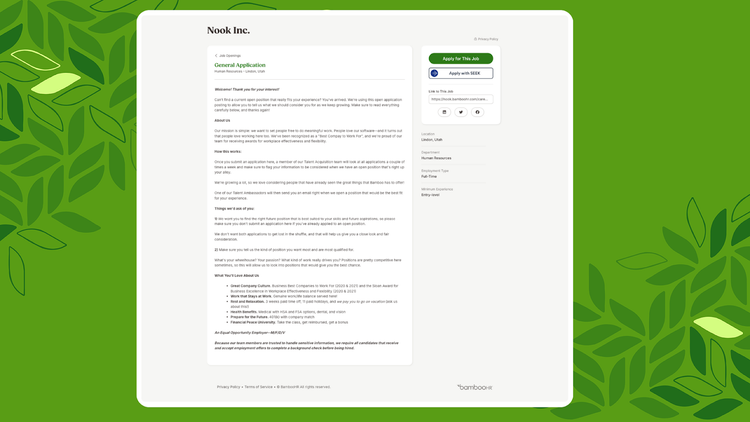
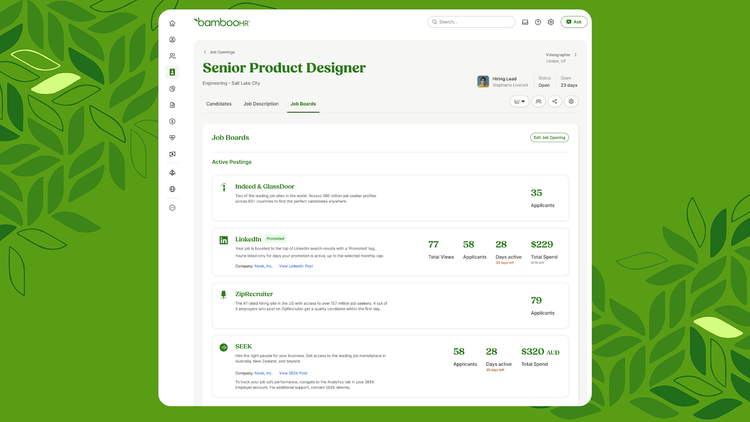
Post jobs directly from BambooHR and manage every applicant in one place. No switching platforms. No manual updates.
Smarter Targeting for Better Matches
SEEK’s AI surfaces your roles to the right candidates across both search results and personalized recommendations.
Branded Job Ads That Stand Out
Assign logos and cover images to match your brand identity. Perfect for organizations hiring under multiple brands.
Automatic Applicant Sync
Every applicant flows directly into BambooHR, keeping your data clean, organized, and always accurate. No extra steps required.
Integration
How To Install
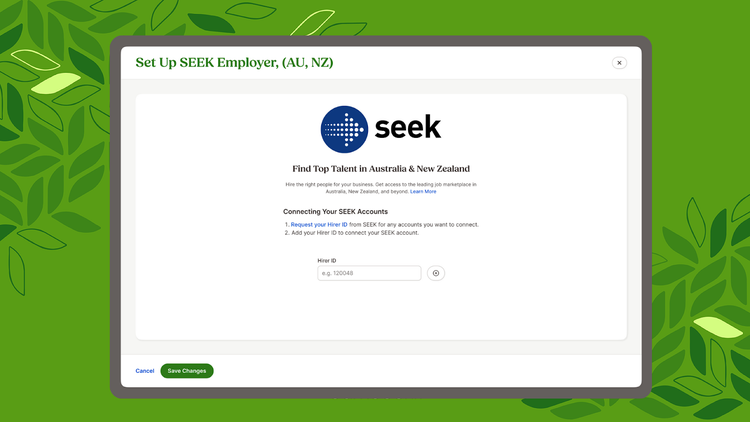
1. Install the SEEK App in BambooHR.
2. During setup, click “Request your Hirer ID from SEEK.”
3. Type “BambooHR” to find the provider.
4. Sign in to your SEEK account.
5. Fill out the “Link Your Software” form.
6. Wait 24–48 hours (SEEK will email your Hirer ID(s).)
7. Copy and paste the Hirer ID into BambooHR to connect your accounts.
Start posting jobs to SEEK right from BambooHR!
How It Works
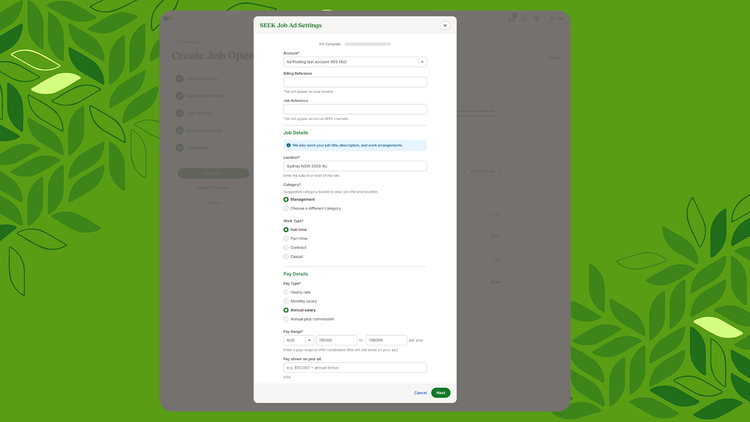
Before posting a job on SEEK, clients will be asked to complete a brief form asking for the details SEEK needs in order to create the posting (the same details as if they were posting in SEEK directly). When the integration is enabled, the information from this form—along with the fields listed below—will automatically sync to SEEK’s system to create the job listing.
What Data Syncs?
FAQ
I don’t have a SEEK account yet. How do I get one?
To post to SEEK through BambooHR, you must have an active SEEK employer account. If you don’t have one yet, reach out to SEEK Customer Service to get set up.
What training resources does SEEK offer?
SEEK provides several resources to help you get the most out of the integration. You can explore training options in SEEK’s How-to Hub or register for an upcoming webinar. If you need additional guidance, you can also contact SEEK Customer Service or your SEEK Account Manager.
How do I set up the SEEK integration in BambooHR?
1. Install the SEEK App in BambooHR.
2. During setup, click “Request your Hirer ID from SEEK.”
3. Type “BambooHR” to find the provider.
4. Sign in to your SEEK account.
5. Fill out the “Link Your Software” form.
6. Wait 24–48 hours (SEEK will email your Hirer ID(s).)
7. Copy and paste the Hirer ID into BambooHR to connect your accounts.
Start posting jobs to SEEK right from BambooHR!
Which BambooHR package do I need?
The SEEK integration is available to customers on any BambooHR package.
How does SEEK pricing work?
SEEK job ads are variably priced, meaning prices adjust based on factors such as market conditions, salary, competition for candidates, and expected likelihood to place. If you have questions about your SEEK pricing or contract, please reach out directly to your SEEK Account Manager or SEEK Customer Service.
Does SEEK have access to my HRIS data in BambooHR?
No. BambooHR only sends job ad data to SEEK for posting. SEEK does not have access to any of your HRIS information.
I need help with billing or my SEEK contract. Who should I talk to?
Billing, contracts, credits, and ad-type questions are handled directly by SEEK. Please contact your SEEK Account Manager or SEEK Customer Service.
Publisher
BambooHR
Updated: 12/1/2025
Phone Support:
1300-658-700
Email Support:
Contact your SEEK Account Manager directly or fill out the Contact Us form on SEEK.
Support Hours:
Monday to Friday, 8:30am - 6pm AEST