Universal Background Screening
Discount Packaging
BambooHR customers are eligible for preferred pricing from Universal Background Screening. Screening packages and pricing are tailored to each organization’s program requirements, service needs, and screening volume. Contact Universal to discuss the options available for your organization.
Overview
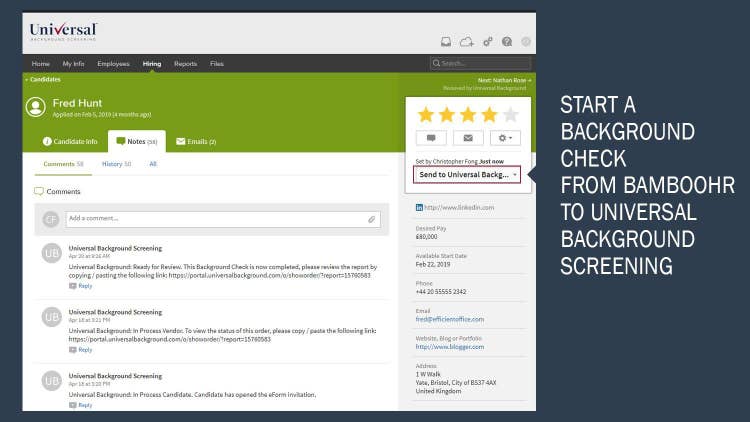
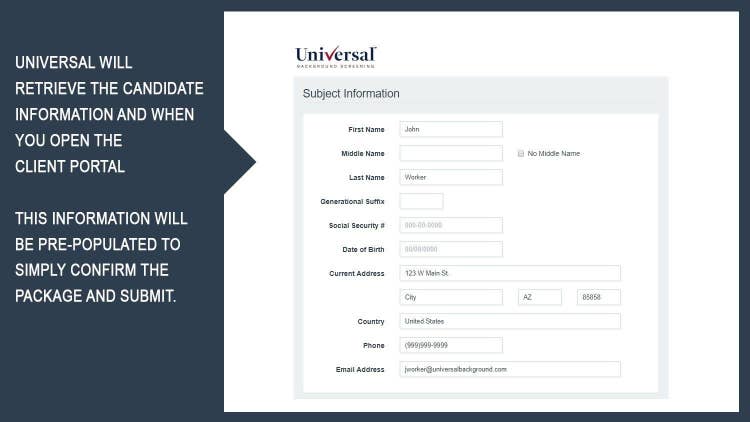
Universal Background Screening helps BambooHR customers connect candidate management and employment screening through an easy-to-use integration. HR teams can initiate a background check by moving a candidate to the designated “Send to Universal Background” status in BambooHR. Relevant candidate information is transferred to Universal and pre-populated in the Universal client portal, helping reduce duplicate data entry and simplify the ordering process. The employer can review the information, confirm the appropriate screening package, and submit the order for processing.
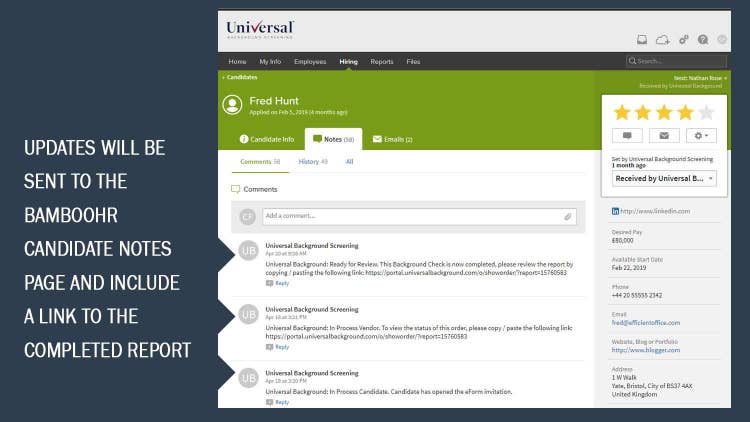
Universal can collect paperless disclosures and authorizations, along with any additional candidate information needed to complete the background check. As the order progresses, screening updates are added to the candidate’s notes in BambooHR. When the background check is complete, a link to the report is returned to the candidate record for convenient access. This connected workflow helps HR teams maintain visibility into screening activity while continuing to manage candidates within BambooHR.
BambooHR customers can access Universal’s suite of employment screening services, including criminal background checks, employment and education verifications, drug testing, physical exams, and related services. Screening packages can be selected based on each organization’s hiring needs and program requirements.
The technology is supported by dedicated customer care. Universal assigns an Account Executive to assist with account setup and ongoing account management, with client services available Monday through Friday. Universal also follows applicable state and federal requirements and industry practices designed to support consistent screening processes.
Universal is accredited by the Professional Background Screening Association (PBSA), reflecting an independent review of its screening policies and procedures against established industry standards. Together, Universal and BambooHR help employers reduce administrative steps, improve access to screening updates and results, and create a more connected experience for HR teams and candidates.
Connected Screening Workflow
Initiate a background check by moving a candidate to the designated status in BambooHR. Relevant candidate information is transferred and pre-populated in Universal’s client portal, helping reduce duplicate data entry.
Screening Updates and Access
Follow screening progress through updates added to the candidate’s BambooHR notes. When processing is complete, a link to the background check report is returned for convenient access.
Customer Care
Universal assigns an Account Executive to assist with account setup.
Client services are available Monday through Friday to support BambooHR customers throughout the screening process.
PBSA-Accredited Provider
Universal is accredited by the Professional Background Screening Association. The accreditation reflects an independent review of Universal’s screening policies and procedures against established industry standards.
Key Differentiators
• Connected BambooHR workflow: Candidate information, screening updates, and completed-report access are connected through the BambooHR candidate record.
• Broad screening capabilities: BambooHR customers can access criminal background checks, employment and education verifications, drug testing, physical exams, and related services.
• Paperless candidate process: Universal can collect electronic disclosures, authorizations, and additional information required to process a background check.
• Dedicated account support: Customers receive assistance from an assigned Account Executive who can help with account setup.
• Compliance-focused approach: Universal follows applicable state and federal requirements and established industry practices designed to support consistent screening processes.
• Accredited screening operations: PBSA accreditation provides independent validation of Universal’s screening policies and procedures.
Better Together Story
BambooHR helps employers centralize candidate information and manage the hiring process, while Universal provides employment-screening services, industry expertise, and dedicated customer care. Together, the integration connects candidate management with background screening through a more efficient workflow.
HR teams can initiate screening from a designated candidate status in BambooHR, transfer relevant candidate information to Universal, and reduce duplicate data entry. Universal can collect paperless disclosures, authorizations, and any additional information needed to process the background check. Screening updates are returned to the candidate’s BambooHR notes, followed by a link to the completed report.
The combined solution gives employers a more connected way to manage candidate screening while maintaining visibility throughout the process. BambooHR customers also gain access to Universal’s background checks, verifications, drug testing, physical exams, and related services, supported by dedicated account management and compliance-focused screening practices.
Integration
How it works.
An integration event is triggered when a requestor moves a candidate into a custom status called "Send to Universal Background". Universal will ping BambooHR's system looking for any candidates in this status, and then receive candidate details through the integration. Universal responds by writing a note to the candidate's notes section, which contains a URL for the requestor to follow to enter the Universal Portal. Candidate data is reviewed, and a package is selected, and then an eForm invitation is sent to the candidate via email. The candidate then enters the Portal and provides missing information, including PII, and then the background order is placed. Upon completion, Universal updates the candidate's notes section, and emails the requestor, notifying them that the background check is completed.
How to Install
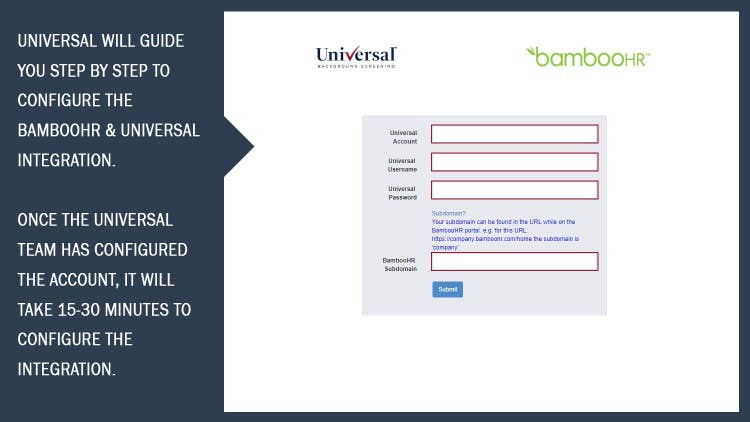
An admin user in BambooHR must add two custom statuses to their BambooHR environment. One is "Send to Universal Background" and the other is "Received by Universal Background". A non-employee Admin user will then be added with the name "Universal Background Screening" to the account. Once both statuses and non-employee user are added, the client will generate an API Token and it will be provided to Universal. Universal will update the account settings internally and complete the configuration. The integration is ready to use once Universal confirms.
What data syncs?
Publisher
Universal Background Screening
Updated: 04/01/2019
Phone Support:
877-263-8033
Email Support:
cs@universalbackground.com
Support Hours:
8 am-8 pm EST
Monday - Friday