ACA Status Validation for Carrier Connections
Getting carrier connections up and running should feel straightforward. Now, admins using ACA Tracking can catch missing employment status mappings before requesting a carrier connection, helping prevent sync failures, implementation delays, and extra troubleshooting later on.
This update adds a proactive validation step directly on the Carriers page. If any employment statuses still need an ACA status assigned, admins can fix them immediately without leaving their workflow.
What's new
When requesting a carrier connection, BambooHR now checks whether all employment statuses are mapped to an ACA status for customers using ACA Tracking.
If any mappings are missing:
- A banner appears on the Carriers page explaining what needs attention.
- The Request Connection button is disabled until mappings are complete.
- Admins can open a modal directly from the banner to assign ACA statuses without leaving the page.
Once all statuses are mapped and saved, admins can immediately continue requesting their connection.
What you'll see
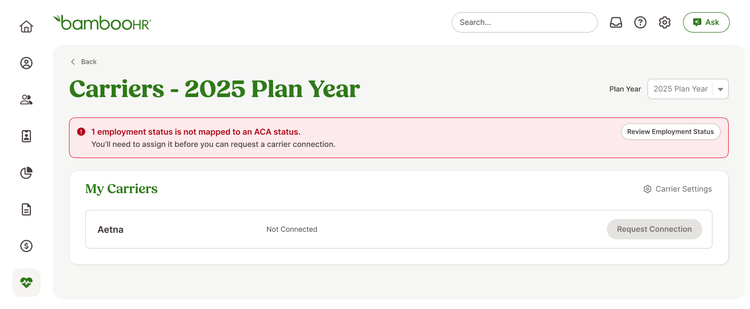
Admins with incomplete ACA mappings will see a new banner and a modal listing only unmapped employment statuses that still need ACA statuses assigned.
Customers without ACA Tracking enabled will not see any changes.
What you can do
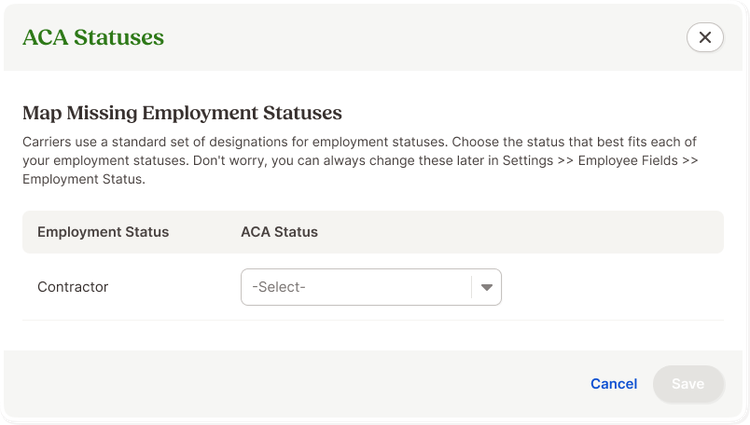
If the banner appears, click Review Employment Status and assign ACA statuses to the listed employment statuses. Save your changes to continue requesting your carrier connection.
As always, we love your feedback! To provide product feedback on this feature and more, head over to our product feedback page and let us know how we’re doing.