VirgilHR In-Product Access
You can now activate and access VirgilHR directly from within BambooHR. This update brings BambooHR Compliance Intelligence, powered by VirgilHR, into your BambooHR account for easier access and improved visibility. Full Admins can activate an account in just a few clicks and securely access VirgilHR using Single-Sign-On (SSO), with no separate login required.
Details
VirgilHR now appears in the Apps section under Settings. If you have not yet activated VirgilHR, it will display under Not Installed. Any Full Admin can select Activate Account to get started. A confirmation window provides a brief overview of the value of BambooHR Compliance Intelligence before completing activation.
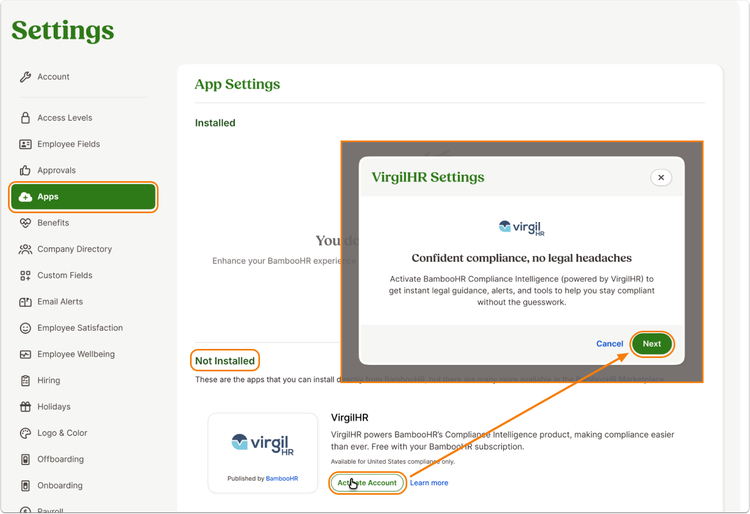
Once activated, BambooHR automatically creates your VirgilHR account. The Full Admin who activates the account becomes an admin in VirgilHR. VirgilHR then moves to the Installed section of the Apps page, and a confirmation message lets you know the account is ready to use.
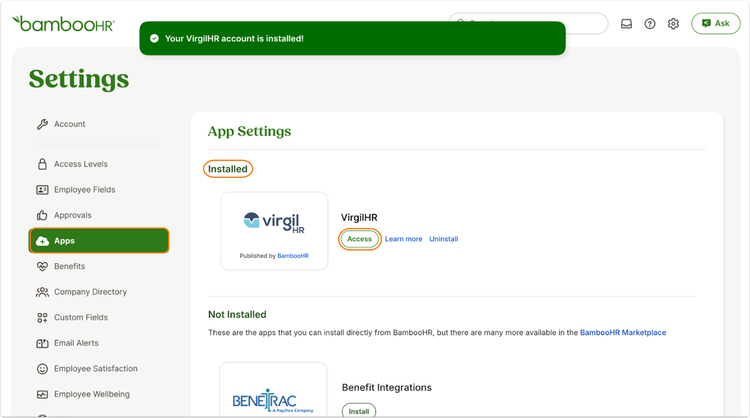
Full Admins can access VirgilHR anytime by navigating to Settings, selecting Apps, and clicking Access. BambooHR signs users in automatically using Single-Sign-On (SSO).
Existing VirgilHR customers will see a seamless transition. BambooHR has mapped current VirgilHR accounts to their associated BambooHR accounts. Without any work on your end, VirgilHR will already appear as activated, and Full Admins can immediately access it through the Apps page using single sign on.
For more information about enabling VirgilHR in your account, check out our help guide.
As always, we love your feedback! To provide product feedback on this feature and more, head over to our product feedback page and let us know how we’re doing.