Accounting Integration Error Handling & Reauthorization
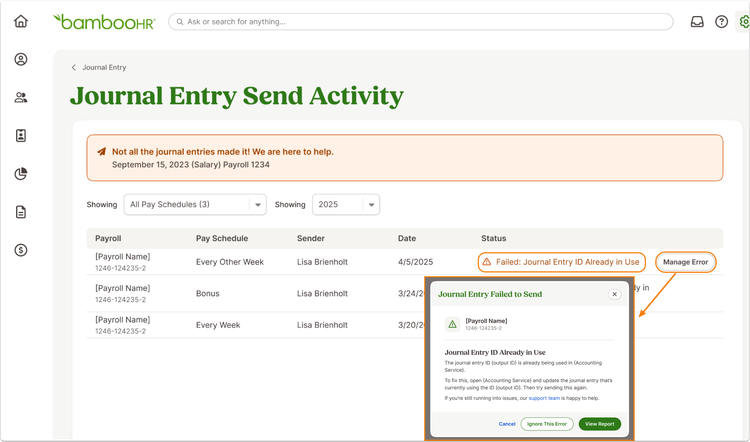
Fix issues faster without digging through technical error codes. When a journal entry fails to sync, you’ll now see clear, plain-language explanations and exactly what to do next, so you can resolve most issues on your own and keep payroll moving.
What's new
Journal entry sync errors now come with clear explanations and guided next steps, helping you quickly understand what went wrong and how to fix it.
Instead of technical messages from your accounting provider, errors are translated into simple, actionable guidance. Each error includes the reason for the failure, the specific item affected, and what action to take next. This reduces back-and-forth troubleshooting and helps you resolve issues in the moment.
Common error types are now easier to handle across supported accounting integrations. For example, you’ll see straightforward guidance if there’s a duplicate journal number, an inactive account, missing permissions, a missing vendor, or an issue with your account mapping. These are some of the most frequent causes of failed syncs, and they’re now much easier to fix without having to contact support.
What you'll see
When a journal entry fails to send, the Send History view now highlights the issue with a clear summary. Expanding the failed entry reveals more detail, including what caused the error and how to resolve it.
This updated experience replaces technical error codes with readable explanations, making it easier to spot issues at a glance and take action right away.
What you can do
Review failed journal entries in Send History, follow the suggested fix, and resend with confidence. Most issues can now be resolved directly without needing additional support.
As always, we love your feedback! To provide product feedback on this feature and more, head over to our product feedback page and let us know how we’re doing.