Employee Community Now Appears in the BambooHR Side Navigation
You can now find Employee Community directly in the BambooHR side navigation, identified by a bee icon and labeled “Community.” Once Community appears, it stays visible across all BambooHR pages where the side navigation is available.
When you select "Community" from the side navigation, BambooHR opens the Employee Community in a new browser tab and directs you directly to the Feed page. This makes it easier to jump into conversations and updates without first navigating through a widget or email link.
This update helps admins and employees get to the Employee Community faster, no matter where they are in BambooHR.
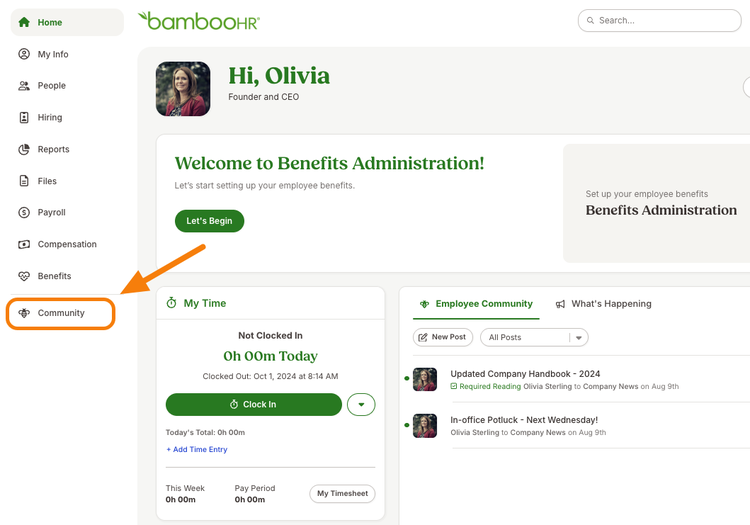
Key Changes:
- Navigation Update: The Employee Community will be represented by a bee icon and the word 'Community' in the side navigation. This update includes both a collapsed and expanded state for the navigation item.
- User Experience: Users at companies that have enabled Employee Community will find it more discoverable and easier to access, as it will now be part of the main navigation.
- Navigation Consistency: Once added, the Community icon will show across all BambooHR pages where the side navigation is present.
This update is part of our ongoing commitment to improve user experience and ensure that key features are easily accessible to all users. We hope this enhancement will make your interaction with BambooHR more efficient and enjoyable.
As always, we love your feedback! To provide product feedback on this feature and more, head over to our product feedback page and let us know how we’re doing.