Add Images to Recognition and Rewards Posts
Giving recognition and rewards just got more personal. Now you can add images directly to recognition posts, making it easier to celebrate achievements with photos, memorable moments, or visual shoutouts that bring your appreciation to life.
What's new
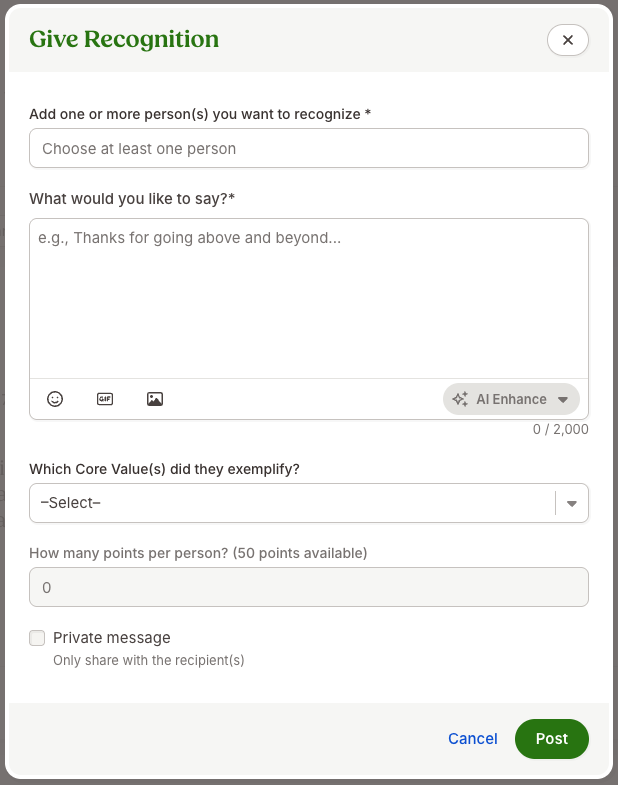
You can now upload one or more images while creating a recognition post directly from the Give Recognition modal. After uploading, images appear inline with your message, and you can resize them before publishing so your post looks just the way you want.
Published recognition posts will display images in the recognition feed and in recognition email notifications, helping your message have even more impact wherever it's viewed. Supported image formats include PNG, JPEG, GIF, and WebP, with a maximum file size of 20 MB per image.
What you'll see
When creating a recognition post, you'll notice a new image upload button beside the existing GIF option. After selecting an image, it appears directly within your message, where you can adjust its size before posting.
What you can do
The next time you recognize a teammate, include photos or other images that help tell the story behind the recognition. Add your image, resize it if needed, and publish your post to create a more engaging recognition experience.
As always, we love your feedback! To provide product feedback on this feature and more, head over to our product feedback page and let us know how we’re doing.