Additional Editing Functions in Admin Approval
We have enhanced the admin approval page to provide a more streamlined experience for editing benefit elections. All editing functions, including enrollment status, covered dependents, coverage levels, costs, and effective dates, are now accessible in one place on the admin approval page. This update is designed to help administrators manage benefits settings more effectively in BambooHR.
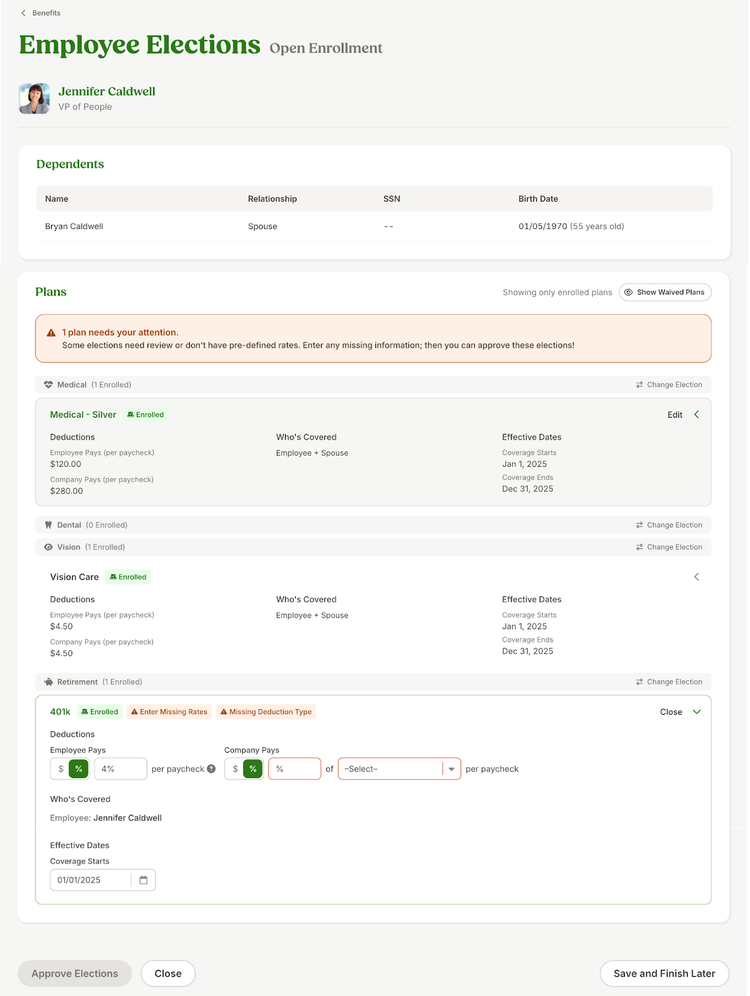
The admin approval page defaults to show only the plans the employee has elected to enroll in, with an option to view waived plans as well. Certain plans will require you to enter cost information (see 401k plan in the example above). In this case, a banner will appear within the Plans section, along with the number of plans that need attention (highlighted). As you add cost information, the banner will eventually turn green, indicating that all plan details are now complete.
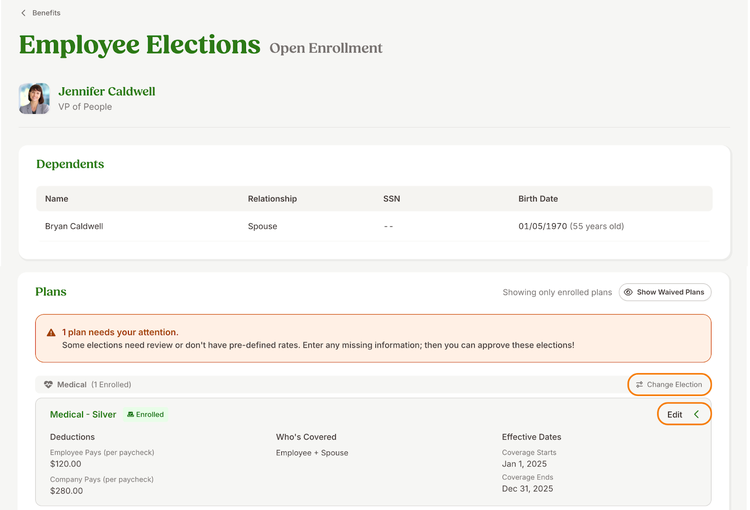
If you need to update an employee’s benefit election before or after the final approval, you can either click Edit to modify enrollment details or Change Election (plan type-specific) to enroll the employee in a different plan or waive coverage entirely. For more details, please refer to this help guide.
As always, we love your feedback! To provide product feedback on this feature and more, head over to our product feedback page and let us know how we’re doing.