Approved Hours Report Updates
Here’s the scoop! The Approved Hours Report is now more accurate for employees who work multiple shifts at different pay rates in the same day, so you can trust what you’re seeing when reviewing hours and rates for payroll.
What’s new
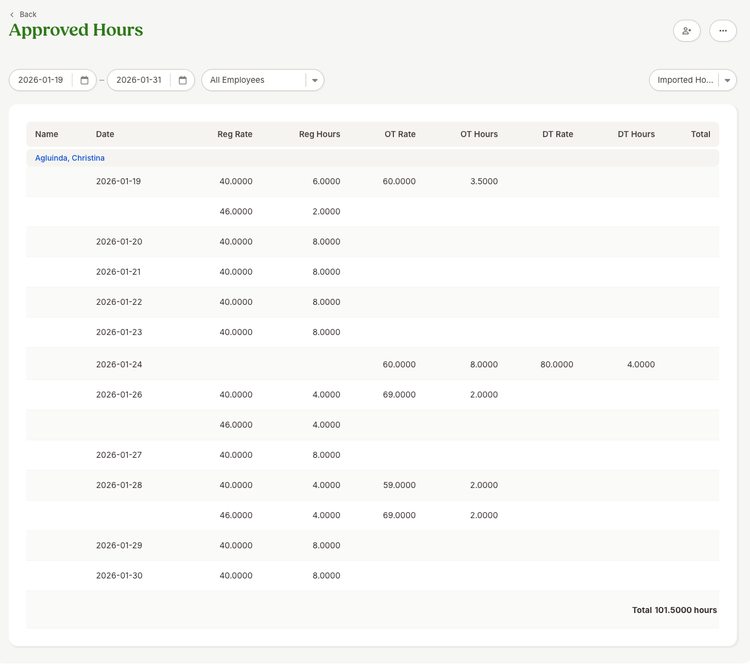
- The Approved Hours Report now shows separate rows for each distinct pay rate within the same day (by rate type, like regular time and overtime), instead of combining everything into one line.
Important note
- This update only applies to hours manually imported or synced through the API. It does not apply to time tracking hours.
What you’ll see
- In the web report: You may see multiple rows for the same employee on the same day when more than one pay rate applies. To keep the report easy to scan, the date appears only on the first row for that day, and the following rows leave the date blank.
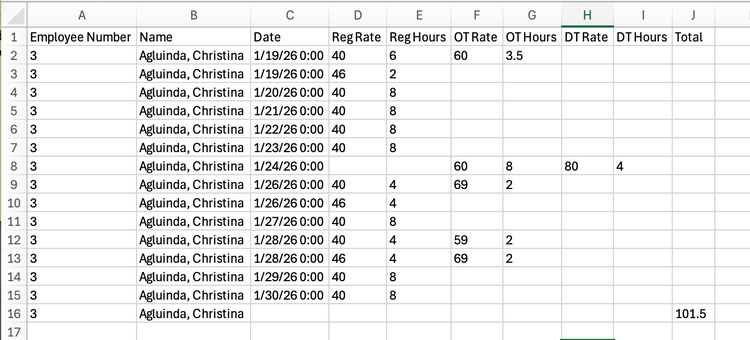
- In exports (CSV/Excel/PDF): Every row includes the full date value, making it easier to sort and use the file in payroll workflows.
What you can do
- If you have employees who work split-rate days, run the Approved Hours Report again and verify that you can now see each rate clearly.
- If you rely on exports for payroll processing, re-export the report to get the fully populated date values per row.
As always, we love your feedback! To provide product feedback on this feature and more, head over to our product feedback page and let us know how we’re doing.