Audit Trail Agent Attribution and UI Updates (Beta)
Know who, or what, made a change in BambooHR. The updated Audit Trail gives admins clearer visibility into whether activity came directly from a person or through Chat, helping create a more transparent and reliable record of account activity.
This feature is currently in Beta. Functionality may change as development continues and may be removed from your account at any time without notice. Access may be limited to specific packages if it becomes generally available.
What's new
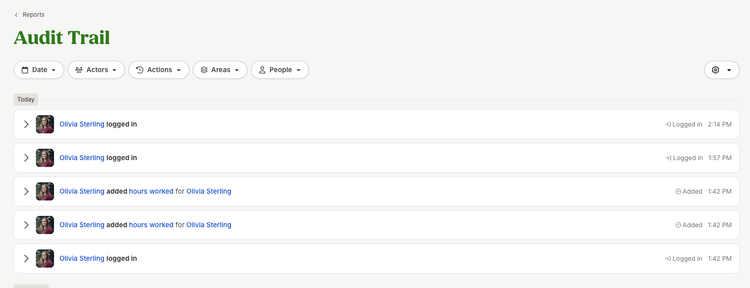
The Audit Trail has a refreshed layout that makes activity easier to scan and understand. Each entry now identifies the actor visually and provides a plain-language description, action type, and timestamp. Human activity displays the user's profile photo, activity completed with Bamboo AI adds a visual indicator to the user's avatar, and actions completed by Bamboo AI display a dedicated Bamboo AI icon.
Admins can narrow the report using filters for date, actor, action, area, and person, making it easier to find the activity that matters. Events are also grouped by date for quicker review.
For more context, admins can expand an entry to see detailed information about the change, including the affected employee, attribute, change, and available context. For activity involving Ask BambooHR, expanded details can provide additional context about the interaction behind the change.
Admins can also use the settings menu to control whether action types and IP addresses appear in collapsed entries. Existing Audit Trail history remains available in the updated experience, so admins keep their historical record while gaining clearer attribution for new activity.
Have feedback about the Needs Your Attention widget? Share your thoughts with us through the feedback option in BambooHR. Your feedback helps us continue improving your experience.