BambooHR AI Connectors
Use BambooHR data without leaving your AI workflow. AI Connectors lets you connect BambooHR to supported AI assistants, including Claude, ChatGPT, and Gemini, making it easy to access HR information, complete common tasks, and generate insights from the AI tools you already use. With secure access to your BambooHR data, you can spend less time switching between applications and more time getting work done.
What's new
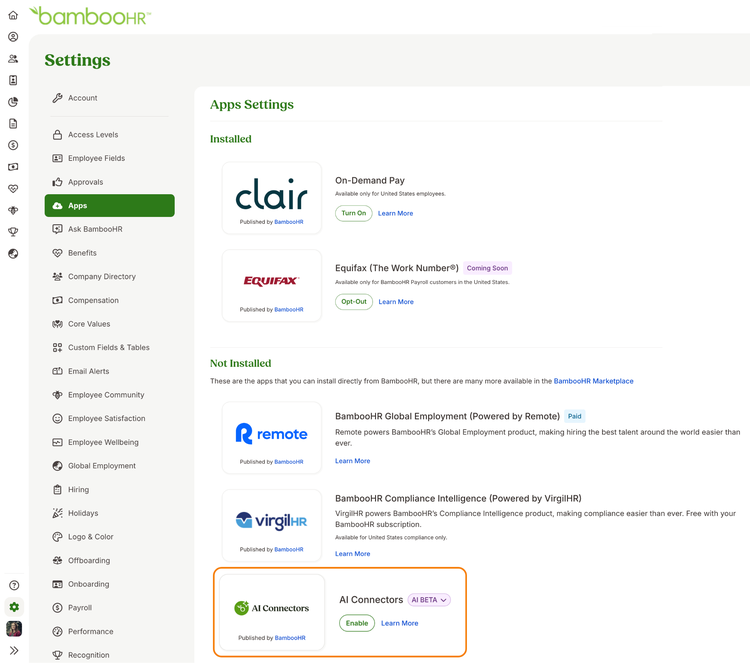
AI Connectors is available in Settings > Apps, where administrators can enable the feature and manage access. Options are available to provide access to admins only, specific access levels, or everyone at the company.
With AI Connectors enabled, you can use your AI assistant to connect data from BambooHR to other connected applications as well. Request time off in BambooHR and automatically block the dates off in your calendar. Or identify all employees in BambooHR who have not received a raise this year and email the results to leadership.
Once your account is connected, you can use your AI assistant to review real-time BambooHR information based on your access permissions, including who's out, time off balances, employee profiles, hiring progress, and benefits information. You can also complete select actions, such as updating basic employee information. Before any changes are applied, you'll review and confirm the request so you stay in control.
The BambooHR connector for Claude is currently available in Beta. Connections to ChatGPT and Gemini will be available in a future release. For step-by-step instructions on installing the BambooHR connector in your Claude account, see the AI Connectors help guide.
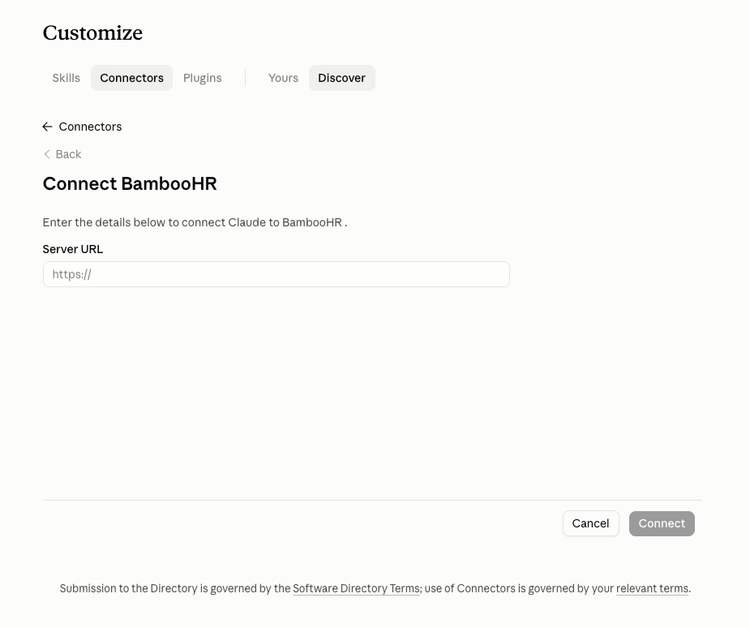
- Important: When connecting to Claude, you will be prompted in Claude to enter a URL for your BambooHR account. This URL needs to be your company domain + api/mcp. Example: https://yourcompany.bamboohr.com/api/mcp
Your feedback directly informs the development of this feature. Select the AI Beta badge in BambooHR, choose thumbs up or thumbs down, and then select Share feedback to tell us about your experience.