BambooHR Payroll Deductions Enhancements
We're excited to announce two new features that will make managing payroll and employee deductions simpler and more efficient.
Add One-Time Deductions While Running Payroll
Now you can add one-time deductions directly within the "Run Payroll" feature. This new functionality eliminates the need to exit the payroll process to manually set up a deduction with specific start and end dates, which was often inefficient and prone to errors.
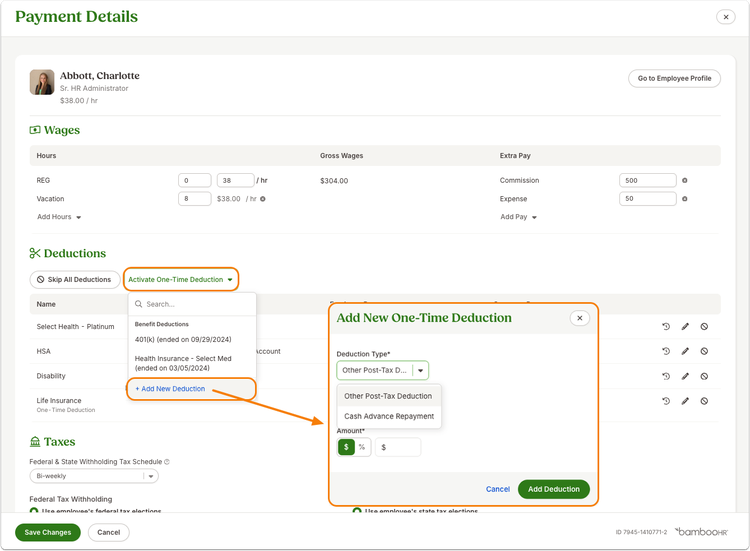
- You can now add a one-time deduction for Other Post-Tax and Cash Repayment right from the Payment Details page in the "Run Payroll" feature.
- The deduction will only be active for the current payroll period and will not carry over to the next one.
Reactivate Deductions with Ease
Our second enhancement allows you to easily reactivate non-benefit deductions from an employee's record, reducing the time and complexity of managing them. Previously, the only way to re-enable a deduction was to manually create a new one with the same name.
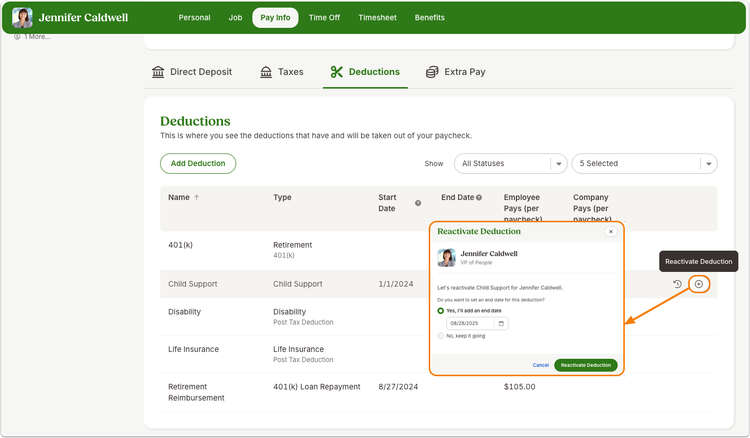
- From an employee's Pay Info tab, go to the Deductions section.
- Hover over an ended deduction to see the Reactivate Deduction button.
- When you click the button, a modal will appear, giving you the option to add a new end date or remove the end date completely so the deduction continues indefinitely.
These features are available to all payroll customers and users with the "Run Payroll" permission or the "Pay Info > Deductions > Edit" access level.
As always, we love your feedback! To provide product feedback on this feature and more, head over to our product feedback page and let us know how we’re doing. Happy Bambooing!