Bulk Actions for Project Tracking
Keeping Project Tracking organized just got a lot easier. Admins can now update multiple projects at once in Time & Attendance, making it faster to archive, restore, or remove projects without working through them one by one. This update helps reduce repetitive admin work and makes large project lists much easier to maintain.
What's new
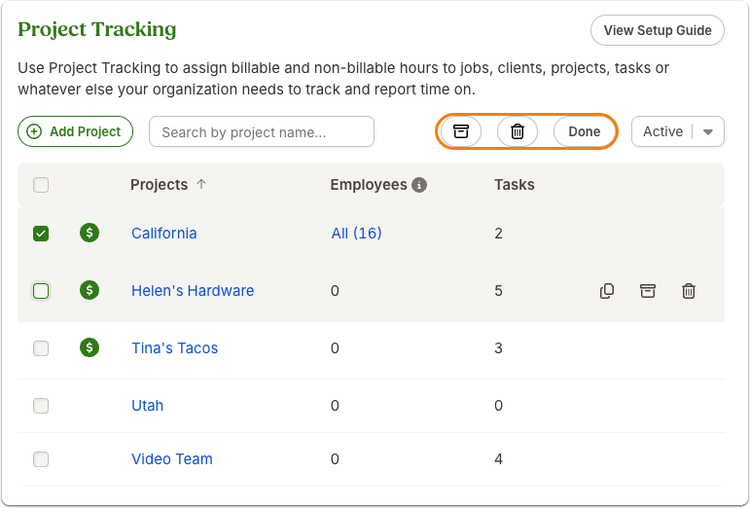
Project Tracking now supports bulk actions directly within the existing Time & Attendance experience. Admins can select multiple projects at the same time and complete key maintenance tasks in a single workflow.
With bulk actions, admins can:
- Archive multiple projects at once
- Unarchive archived projects in bulk
- Delete multiple projects in one action
- Filter between active and archived projects while managing updates
To help prevent accidental deletions, bulk delete actions include an added confirmation step requiring admins to type “Delete” before the action is completed. Existing permissions and project functionality remain unchanged, and no setup is required.
What you'll see
Admins will now see a new bulk selection option within Project Tracking in Time & Attendance. After selecting projects, bulk action controls appear so admins can quickly archive, unarchive, or delete multiple projects from the same screen.
Archived projects can still be restored using the unarchive action, and search filters continue to work alongside bulk actions to help narrow down large project lists.
What you can do
Head to Settings > Time & Attendance > Project Tracking to start using bulk actions right away. Select multiple projects, choose the action you want to take, and confirm the update. No additional setup or migration is needed.
As always, we love your feedback! To provide product feedback on this feature and more, head over to our product feedback page and let us know how we’re doing.
As always, we love your feedback! To provide product feedback on this feature and more, head over to our product feedback page and let us know how we’re doing.