Carrier Connection Management Tools
We are introducing a new, streamlined way to manage your carrier connections directly within BambooHR. The Carriers dashboard and request features give administrators a clear, self-service experience for viewing, requesting, and tracking carrier connections without requiring multiple support interactions. This new process increases transparency, efficiency, and confidence in benefits administration.
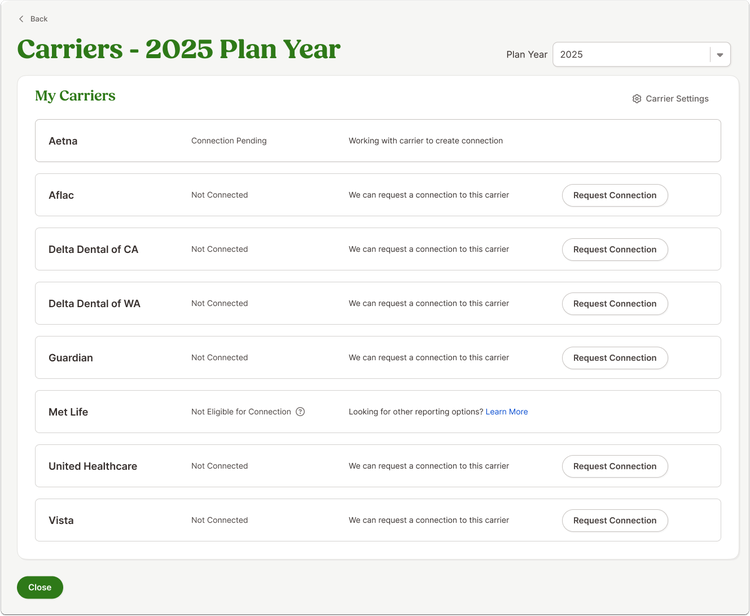
The new Carriers dashboard provides an at-a-glance view of all your carriers, showing their connection status—Connected, Pending, or Not Connected. You can view which carriers are automatically updated, which require attention, and which are eligible for connection. When a carrier is not connected, you can submit a request if you meet their eligibility criteria. Before submitting a request, the system alerts you to any missing employee and plan information required for the connection to work effectively, so you can resolve those items first.
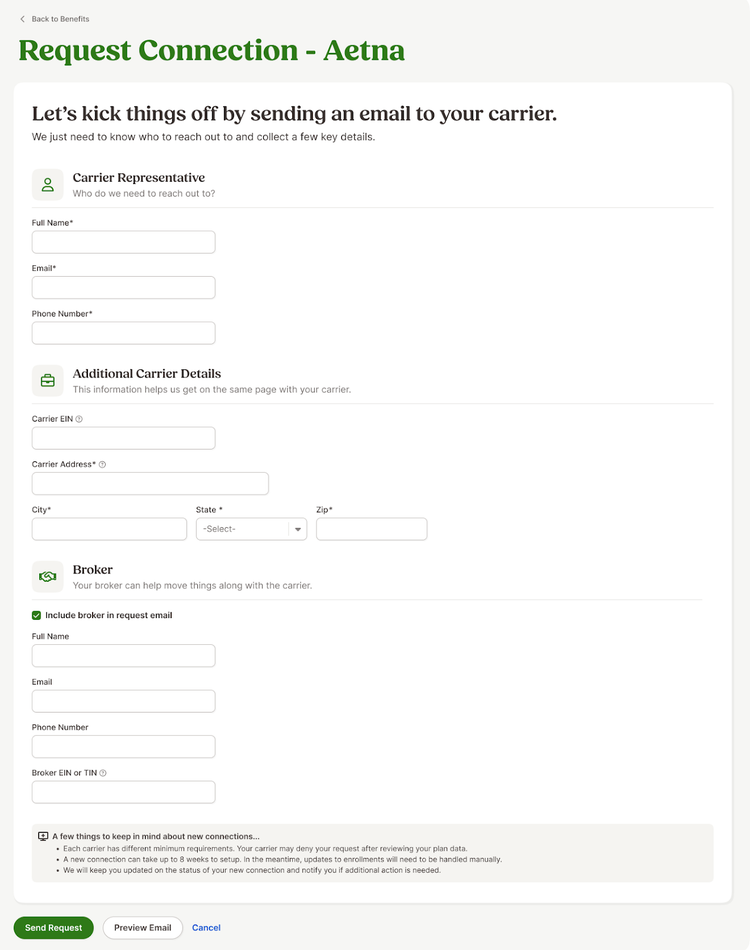
Once ready, you will complete a request form that collects contact information for your carrier representative (and broker, if applicable). After submission, BambooHR automatically sends a standardized connection request email to all relevant parties, including you, the carrier, the broker (if included), and our Carrier Connections team. From there, you can monitor the connection status right in your Carriers dashboard. When a connection moves from Pending to Connected, the data will automatically flow from BambooHR to your carrier.
This update helps admins navigate the connection process more easily and efficiently.
As always, we love your feedback! To provide product feedback on this feature and more, head over to our product feedback page and let us know how we’re doing.