Change Communication Letter Improvements
A little more confidence goes a long way. Now, before sending a change communication letter, you can review exactly what employees will receive and choose the right email address. This update adds clarity and control to a sensitive step in the compensation cycle, helping you avoid mistakes and ensure the message lands as intended.
What's new
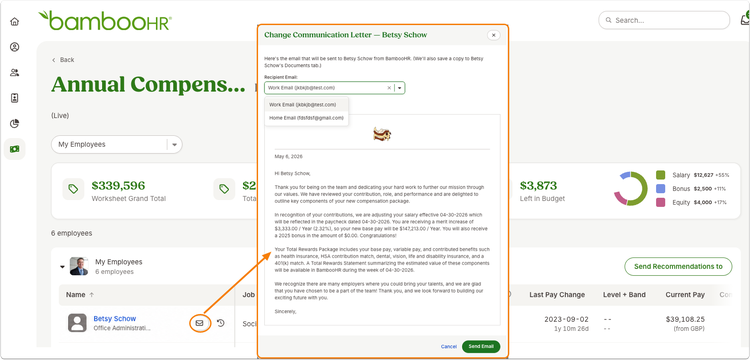
You can now preview and confirm change communication letters before they go out. Opening the send option launches a modal that shows the fully rendered email with all details filled in, so you know exactly what the employee will see.
You also have the ability to select which email address to use when an employee has more than one on file. If no email exists, you can still generate and store the letter as a PDF in the employee’s Documents tab.
To keep you informed, the experience now shows when a letter was last sent or saved, along with the destination, so you always have visibility into past communication.
What you'll see
When selecting the send option from the comp planning worksheet, a preview window appears instead of sending immediately. Inside, you’ll see the completed letter, a selectable email field when multiple addresses are available, and a clear record of previous send or save actions. The primary action button will adjust based on what has already been done, such as resending or resaving.
What you can do
Take a moment to review each letter before sending to ensure accuracy and tone. Choose the most appropriate email address when multiple options exist, and rely on the send history to confirm whether communication has already been delivered.
As always, we love your feedback! To provide product feedback on this feature and more, head over to our product feedback page and let us know how we’re doing.