Chat Conversations in Ask BambooHR
Finding your work in Ask BambooHR just got a whole lot easier. Chat Conversations gives you organized, persistent chat history so you can pick up where you left off, revisit past questions, and manage conversations without endless scrolling. The result is a more reliable, structured experience that helps you move faster and stay focused.
What's new
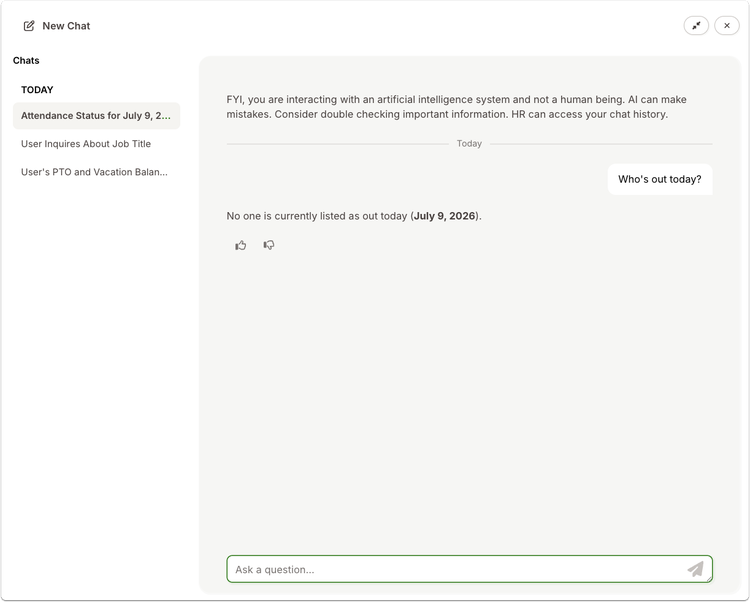
Ask BambooHR now organizes your chats into individual conversations, each with its own history and title. Instead of one long thread, you can move between distinct topics with clarity and confidence.
Each new chat starts as a fresh session and is automatically given a short, relevant title after your first exchange. You can rename conversations anytime to match your workflow or delete ones you no longer need. A searchable sidebar keeps your recent conversations within reach, making it easy to jump back into prior work without losing context.
What you'll see
When you open Ask, a new conversation starts automatically. As you interact, a title appears to reflect the topic, helping you quickly recognize it later.
A sidebar displays your conversations, sorted by most recent, with your current session highlighted. From there, you can search, rename, or delete conversations directly, giving you more control over how your work is organized.
What you can do
Start new conversations whenever you switch topics to keep things organized. Rename important chats so they are easy to find later, and use the search feature to quickly return to past questions or workflows.
As always, we love your feedback! To provide product feedback on this feature and more, head over to our product feedback page and let us know how we’re doing.