Choose How Time Off Balances Display for Your Global Employees
Give your global employees a clearer picture of their available time off! With a new setting for the Remote integration, you can choose which time off balance employees see in BambooHR, helping them make more informed decisions when planning time away.
What's new
The new Time Off Balance Display setting lets you choose between two balance options for your Employer of Record (EOR) employees:
- Available Balance (recommended): Shows how much time off an employee has accrued, minus time already taken or scheduled. This gives employees a more accurate view of the time off they've earned.
- Annual Balance: Shows an employee's full yearly time off allowance, minus time already taken. This matches the existing BambooHR experience and the primary balance displayed in Remote.
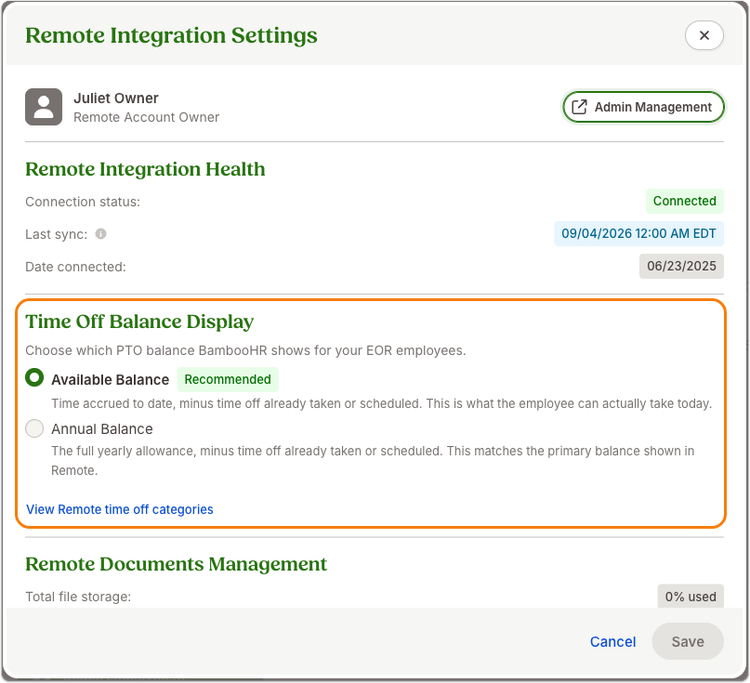
You can find this setting under Settings > Global Employment > and then clicking the gear icon. Existing customers will continue to see Annual Balance unless an admin chooses to change it.
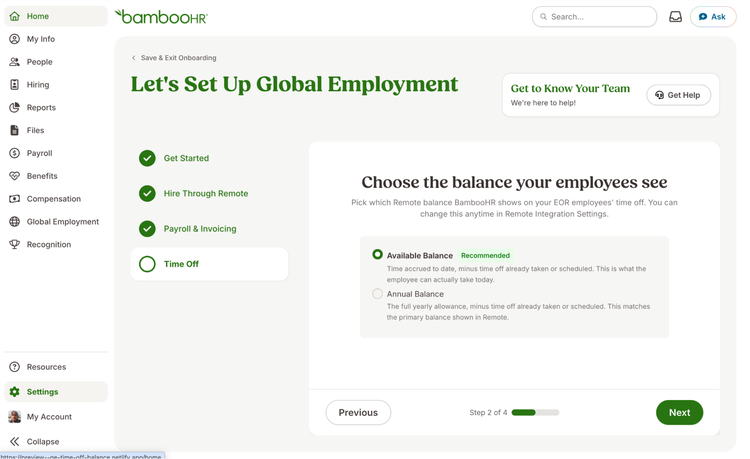
For new customers connecting to Remote, this choice is also included in the Time Off step of Global Employment onboarding, making it easy to select the right balance display from the start.
Employees can now also see a negative time off balance when they've used more time than they've earned, providing greater visibility into their actual balance.
Keep in mind that this setting only changes how balances are displayed. It doesn't affect which time off categories employees see or prevent them from requesting more time off than they've accrued.
As always, we love your feedback! To provide product feedback on this feature and more, head over to our product feedback page and let us know how we’re doing. Happy Bambooing!