Comp Benchmarking - Currency Selector
Understanding global compensation just got easier. You can now view benchmark data in the currency that makes the most sense for your analysis, helping you compare markets more accurately and communicate insights with confidence. This update brings more clarity and flexibility to every step of your compensation workflow.
What's new
You can now switch between currencies directly within the compensation benchmarking experience, which means you are no longer tied to a single company default. This flexibility makes it easier to interpret global data in its original context and align with local expectations.
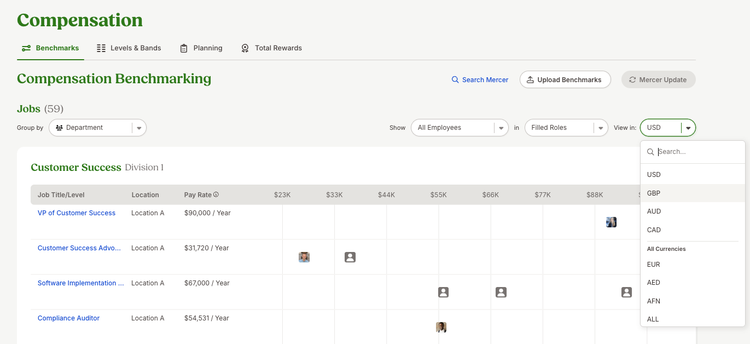
The currency selector is available throughout the experience, keeping your view consistent whether you are reviewing charts, diving into details, or comparing benchmarks. When you choose a currency, all values update instantly across the page.
You also have greater visibility into how data is presented. You can view benchmarks in their native currency or see clearly when values have been converted, providing the right balance of accuracy and clarity.
Behind the scenes, conversions are powered by up-to-date exchange rates, so you can trust the numbers you use to make decisions.
What you'll see
A new currency dropdown appears across key benchmarking pages, including the main benchmarks view, detailed benchmark pages, and search results. Selecting a different currency refreshes all monetary values, charts, and tables in real time.
When data is converted, the interface clearly indicates it, so you always know how values are being displayed.
What you can do
Start exploring your benchmark data in the currency that best fits your needs. Use the selector to compare global markets, validate compensation ranges, or present insights to stakeholders in a more familiar format.
As always, we love your feedback! To provide product feedback on this feature and more, head over to our product feedback page and let us know how we’re doing.