Compensation Budget Uploader
We are excited to announce the release of the Compensation Budget Uploader. This enhancement is designed to streamline the budget entry process, reducing time and errors associated with manually entering hundreds of budget rows.
With just a few clicks, compensation planners, recommenders, and approvers can upload budget data, eliminating the need for manual entry.
From the Compensation Tab > Planning > Compensation Cycle > Budget > Budget Breakdown > Import Budget, you can add your budget. You can also export your budgets to download a CSV file of the current budget entries.
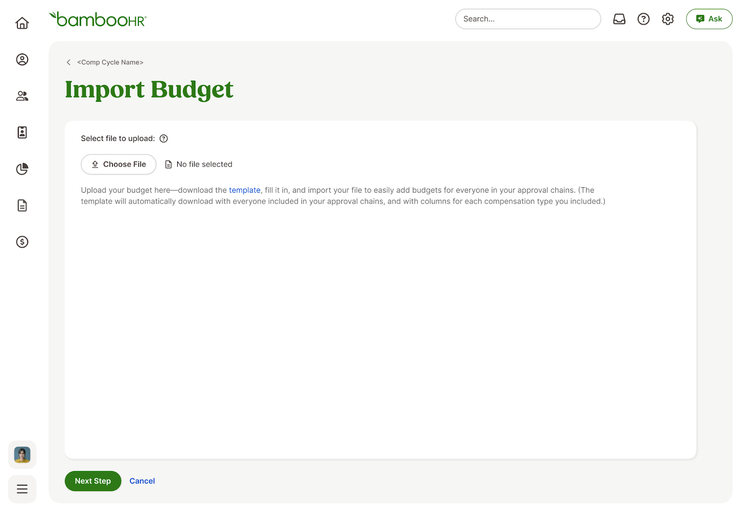
Unlike static templates, our dynamic CSV template is generated based on the selected comp types for the cycle. It includes only employees who need a budget, along with their email addresses, which serve as the key for budget allocation.
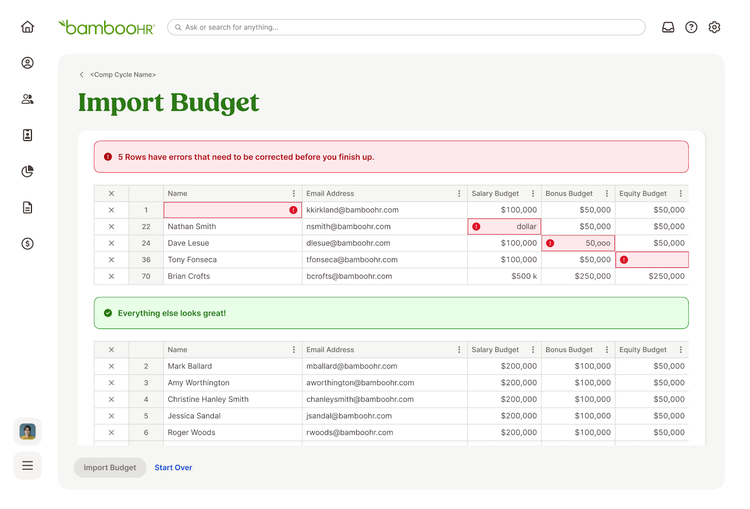
After initiating an import, users are directed to a data cleaner page to resolve any issues before finalizing the import. The "Import Budget" button remains disabled until all issues are resolved.
As always, we love your feedback! To provide product feedback on this feature and more, head over to our product feedback page and let us know how we’re doing.