Custom Report Builder: Column Summaries
You can now summarize your report data directly in BambooHR using the new custom report builder. Column summaries help you quickly understand totals, averages, and other key metrics without exporting data to another tool. This update gives you more flexibility and faster insights right where you build your reports.
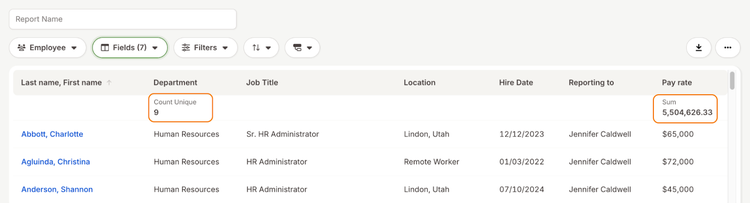
With column summaries, you can apply built-in calculations to number, text, and date fields in your reports. The report builder automatically recognizes the type of data in each column and shows only the summary options that make sense for that field. This makes it easy to answer common questions like totals, counts, or typical values at a glance.
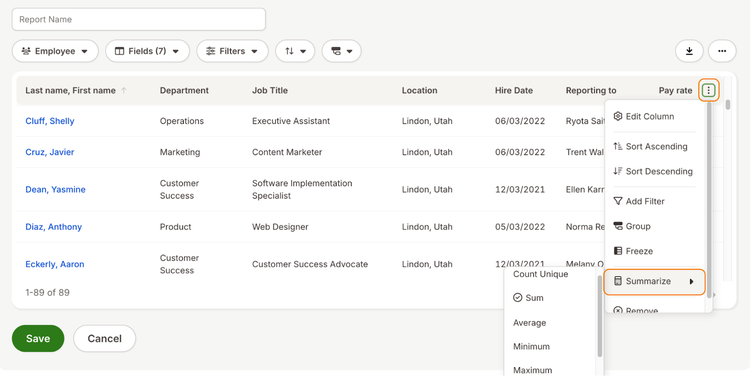
You can add a column summary from the three-dot menu on any column by selecting the Summarize option. Once applied, the summary appears at the top of the column so you can immediately see the result without scrolling or exporting your report.
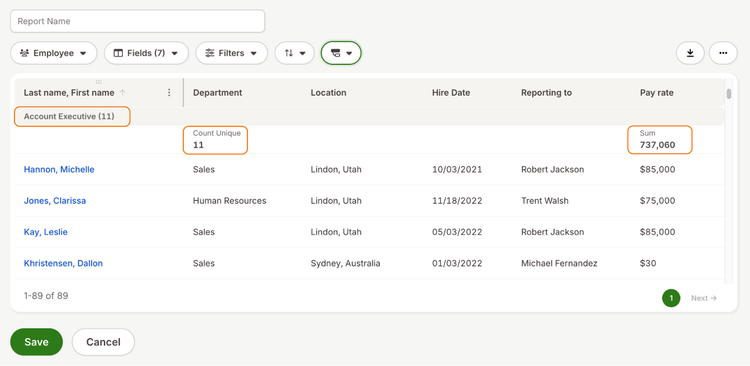
Column summaries also work alongside grouped reports. When you group your data, BambooHR shows an overall summary at the top of the report and individual summaries for each group. This helps you compare groups while still keeping an accurate total view of your data.
As always, we love your feedback! To provide product feedback on this feature and others, visit our product feedback page and let us know how we’re doing.