Keep Benefits and Payroll in Sync with the Employee Navigator Integration
Managing benefits and payroll in separate systems often means updating the same information twice, and every missed update is a chance for payroll errors or eligibility gaps. The Employee Navigator integration connects BambooHR with Employee Navigator so your employee data stays aligned in both places. If you use BambooHR Payroll, benefit deductions can also flow directly into your payroll runs.
The result is less double entry, fewer payroll corrections, and one source of truth for employee and benefits data.
What’s new
Automatic demographic sync
Employee demographic data, such as name, address, contact information, hire date, employment status, and job details, syncs automatically whenever it's updated in either BambooHR or Employee Navigator. Employee Navigator always has the information it needs to manage benefit eligibility.
Benefit deductions in payroll runs
For BambooHR Payroll customers, benefit deductions set up in Employee Navigator flow directly into your payroll runs using the deduction codes you configure during setup. Deductions sync one way, from Employee Navigator to BambooHR, so payroll stays aligned with what employees have elected.
What you'll see
Account Owners can turn on the integration from Settings > Apps, with no support ticket required. A guided setup lets you choose whether to sync demographic data only or include payroll data, set up deduction codes, and connect your accounts.
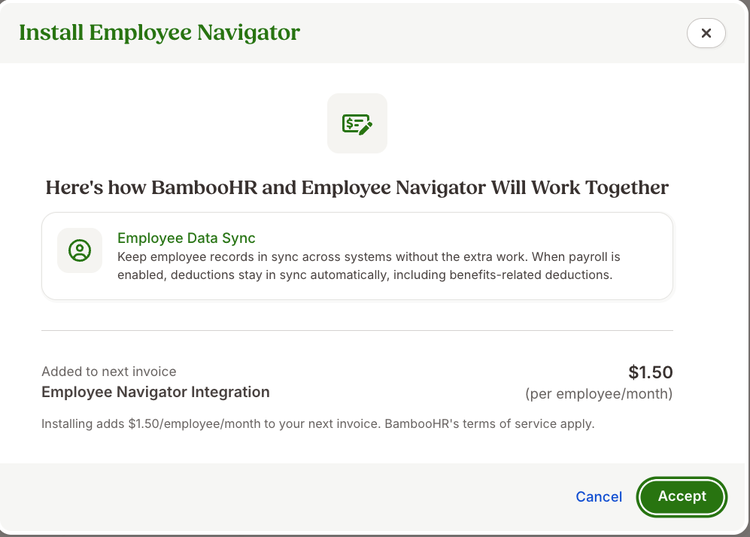
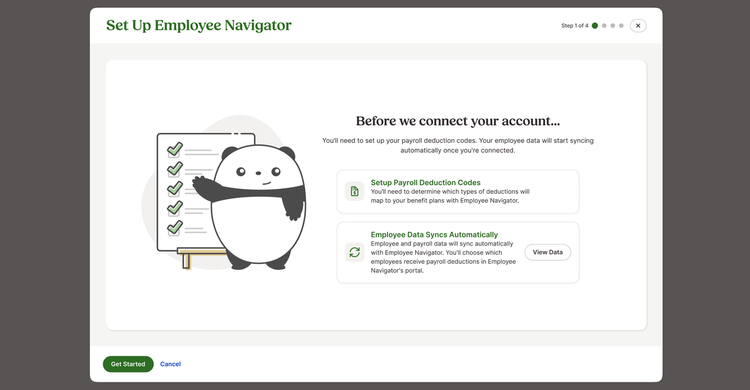
If you already manage active benefit plans in BambooHR, you'll map your current deductions to their Employee Navigator equivalents during setup. Once Employee Navigator deductions begin flowing in, you'll be prompted to end the corresponding plans in BambooHR.
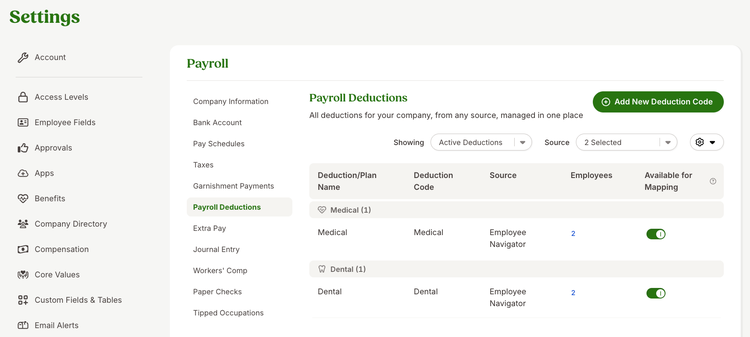
Synced deductions appear on a dedicated page in Payroll Settings and in the Employee Navigator Deductions Report, where you can search each employee's plans, deduction amounts, employer contributions, frequencies, and effective dates.
What you can do
Connect your accounts to eliminate duplicate entry of employee and benefits data. Before each payroll run, review your synced deductions to confirm they match benefit elections.
As always, we love your feedback! To provide product feedback on this feature and more, head over to our product feedback page and let us know how we’re doing.