Employee Snapshot
We are excited to announce the Employee Snapshot to help you quickly view key employee information without leaving your current task. This update reduces context switching and gives you fast, trusted access to the details you need. It provides a simple way to see an employee’s basic info, job details, reporting structure, and history in one convenient place.
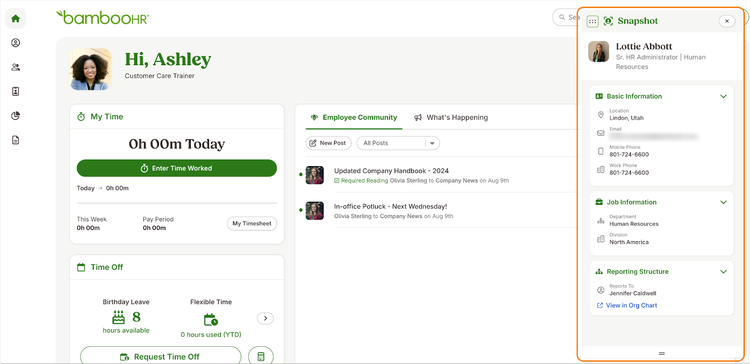
The Employee Snapshot appears when you select an employee from global search or choose Snapshot from the employee hover card. What you see depends on your access level and company directory settings. Admins will see the full set of available fields, while other users will see only the information they are allowed to access. Snapshot data is view-only.
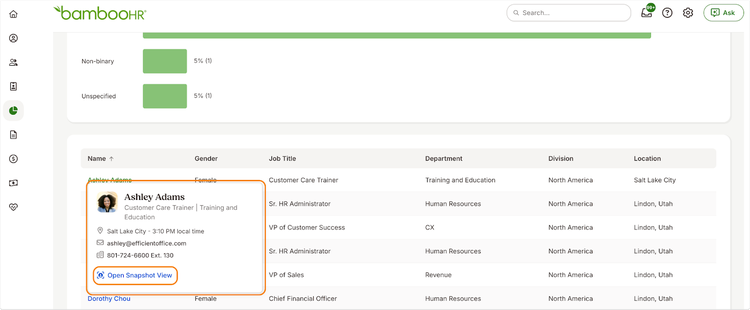
You can open the Snapshot from two places. When you search for an employee in global search, you will see the Snapshot if you do not have access to their full profile. You can also hover over an employee name anywhere in BambooHR to open the hover card and then choose the Snapshot option. The Snapshot gives you quick access to essential details like location, contact information, job status, departments, teams, and reporting structure. Custom fields are not included at this time.
As always, we love your feedback! To provide product feedback on this feature and more, head over to our product feedback page and let us know how we’re doing.