Extra Pay End Date
We did it! We’ve added a new feature that’s going to make payroll a whole lot easier for you. We heard your feedback and are excited to announce the launch of our Extra Pay End Date feature.
This new functionality was created to solve a pain point for payroll administrators who currently have no way to specify an end date for recurring extra pay events. Now you can manage payroll more efficiently and accurately, freeing you from the stress of manual tracking, potential errors, and overpayments.
This update introduces an optional "End Date" field for recurring extra pay, and ensures that payments automatically stop on the date you specify. Perfect for managing temporary or seasonal employees and frequent one-time payments.
How It Works
Within Payroll Settings
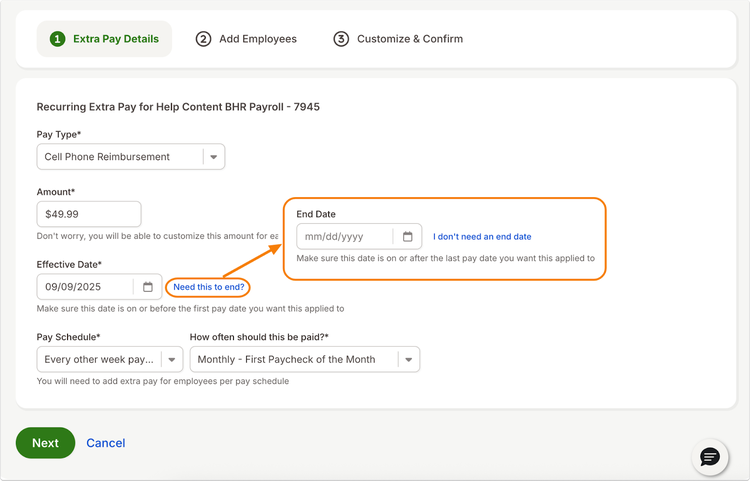
Navigate to Settings > Payroll > Extra Pay. When you add or edit a recurring extra payment, you’ll now see a "Need this to end?" link. When you click this link, a new End Date field will appear.
- Select the end date using the date picker. If you change your mind, you can remove the end date by clicking the "I don't need an end date" link.
Within the Employee Profile
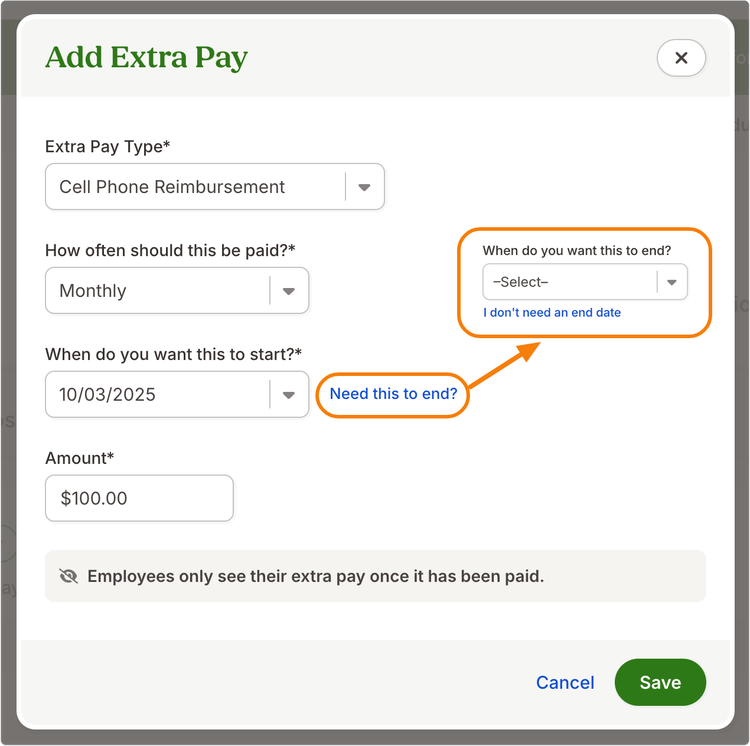
You can also add an end date to extra pay directly from an employee's profile by navigating to Pay Info > Extra Pay. You will now see an "Need this to end?" option when you go to add or edit extra pay
- Select the desired end date from the drop-down menu or click "I don't need an end date" to remove the field.
Important Things to Remember
- The end date cannot be on or before the effective date.
- If you delete a recurring extra pay in bulk, the end date for all employees will be the date of deletion.
- Extra pay events created before this update will not be automatically updated with an end date. You will need to manually add an end date to existing recurring pay events if you want to use this new feature.
We’re thrilled to bring you this update and hope it makes your work life a little bit easier!
As always, we love your feedback! To provide product feedback on this feature and more, head over to our product feedback page and let us know how we’re doing.