Get Insights Into Your Global Hiring With Ask BambooHR®
Hiring globally comes with plenty of questions. Now, you can jump into Ask BambooHR right from the Global Employment Settings page to explore hiring requirements, compare countries, and get insights about your global team, all from one convenient starting point.
What's new
A new Ask About Hiring button in Settings > Global Employment gives you a direct path to Ask BambooHR. When you open it, you'll see starter questions designed around common global employment needs, making it easier to discover the kinds of questions Ask BambooHR can help you answer.
You can get help planning a global hire, compare hiring requirements across countries, or get an overview of your global team. These starting points help you quickly find the information you need, whether you're exploring a new hiring location or checking in on your existing global workforce.
What you’ll see
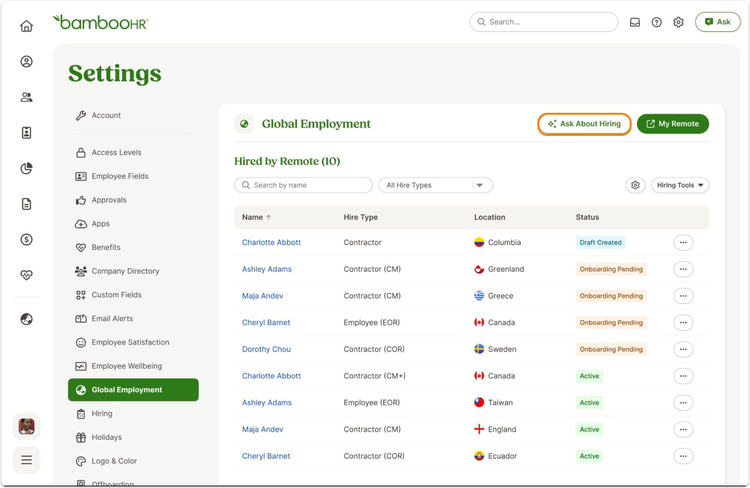
Select Ask About Hiring to open the Ask BambooHR panel with global employment-focused starter questions. Choose one and it becomes your first question, then you can continue the conversation in Ask BambooHR as usual.
When asking about your EOR employees, the information available through Ask BambooHR follows your existing access levels.
What you can do
Head to Settings > Global Employment and select Ask About Hiring to get started. Pick the starter question that best matches what you want to explore, or use it as a jumping-off point for your own global hiring questions. There's nothing additional to set up.
As always, we love your feedback! To provide product feedback on this feature and more, head over to our product feedback page and let us know how we’re doing.