Inbox Error Notifications for Integrations
We are excited to enhance the Xero Payroll integration experience by bringing integration error notifications directly into BambooHR. Now, when a Xero Payroll integration error occurs, Full Admins can view and manage it from the Inbox. This update gives Xero Payroll customers clearer visibility and a faster path to resolution, all within BambooHR.
Details
With this update, any errors related to the Xero Payroll integration automatically appear in the Inbox under a dedicated Errors to Resolve section. This feature supports error notifications across BambooHR, but only customers who experience errors tied to the Xero Payroll integration will see these notifications at this time.
When a Xero Payroll error occurs, BambooHR notifies all Full Admins in three places: the Inbox, the What’s Happening widget on Home, and by email. Each notification includes the same detailed information shared in the email, so admins can quickly understand what needs attention.
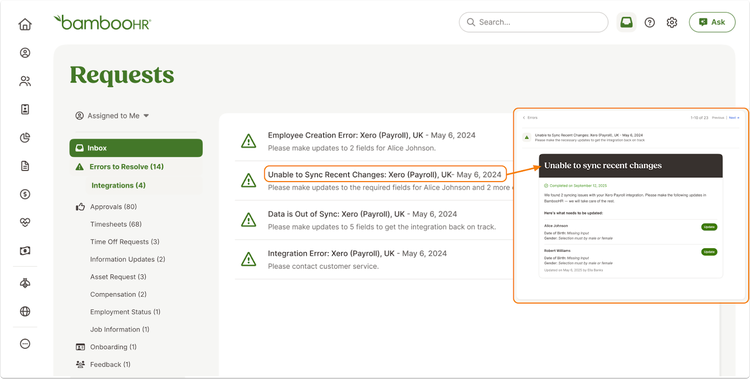
From the notification, admins can select Update to jump directly to the employee profile and correct the data causing the issue. After resolving the error, a Full Admin marks the notification as complete to move it to the Completed section of the Inbox. This process keeps everyone aligned and ensures issues stay visible until fully resolved.
By surfacing Xero Payroll integration errors directly in BambooHR, we help you resolve issues faster, reduce back and forth, and keep your payroll data running smoothly.
As always, we love your feedback! To provide product feedback on this feature and more, head over to our product feedback page and let us know how we’re doing.