Make Rehire Onboarding Easier With New Hire Packets
Rehiring an employee just got more flexible. You can now send a New Hire Packet every time you rehire an employee, even if they completed one during a previous period of employment, making it easier to collect current information and give returning employees a consistent onboarding experience.
What's new
Previously, you could send a New Hire Packet to a rehire only if they hadn't completed one during their previous employment. Now, you can send a new packet whenever you rehire an employee, regardless of whether they've completed one before.
This means returning employees can go through the same streamlined onboarding process again, helping you gather the information you need without relying on manual updates outside the New Hire Packet workflow.
What you’ll see
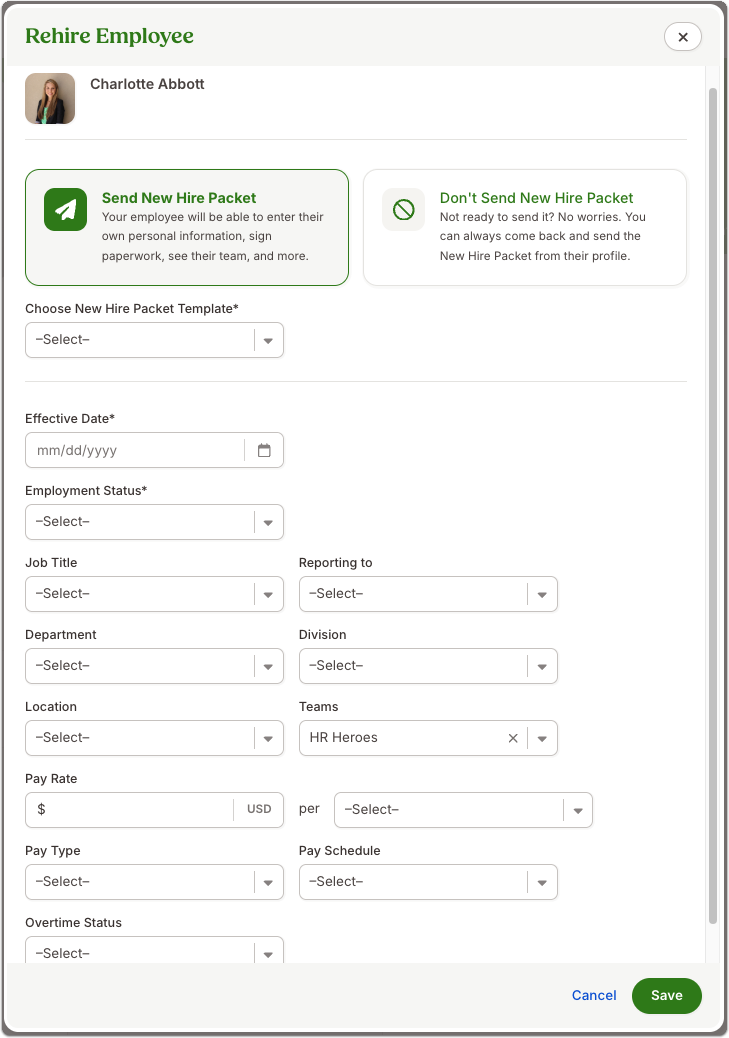
From an inactive employee's profile, select the three-dot menu, then Rehire Employee. In the Rehire Employee window, you can choose to send a New Hire Packet or continue the rehire without one.
If you send a packet, you can select the New Hire Packet template and enter the employee's updated employment details in the same flow.
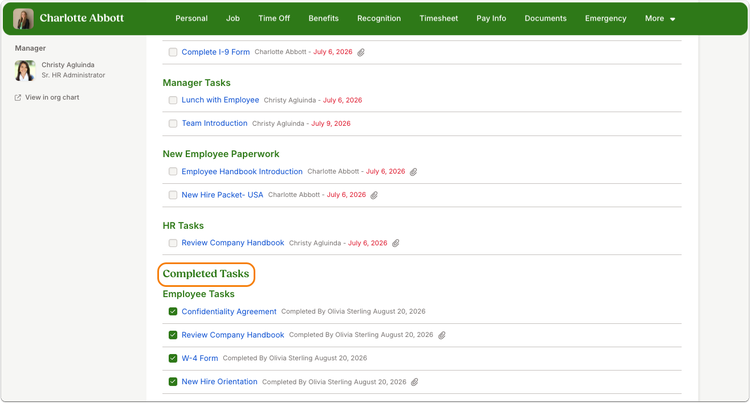
Once the rehire is underway, you can track onboarding progress and tasks from the employee's profile.
What you can do
The next time a previous employee returns, start the rehire from their inactive employee profile. Choose whether they need a New Hire Packet, complete their updated employment information, and keep an eye on their onboarding progress from their profile.
That means less manual onboarding outside BambooHR and a more consistent experience for both your HR team and returning employees.
As always, we love your feedback! To provide product feedback on this feature and more, head over to our product feedback page and let us know how we’re doing.