Manage EOR Contracts Permission in Custom Access Levels
You can now delegate Employer of Record tasks without granting Full Admin access. A new Manage Employer of Record Contracts permission lets you assign EOR responsibilities through custom access levels, helping you scale global hiring while keeping access secure and intentional.
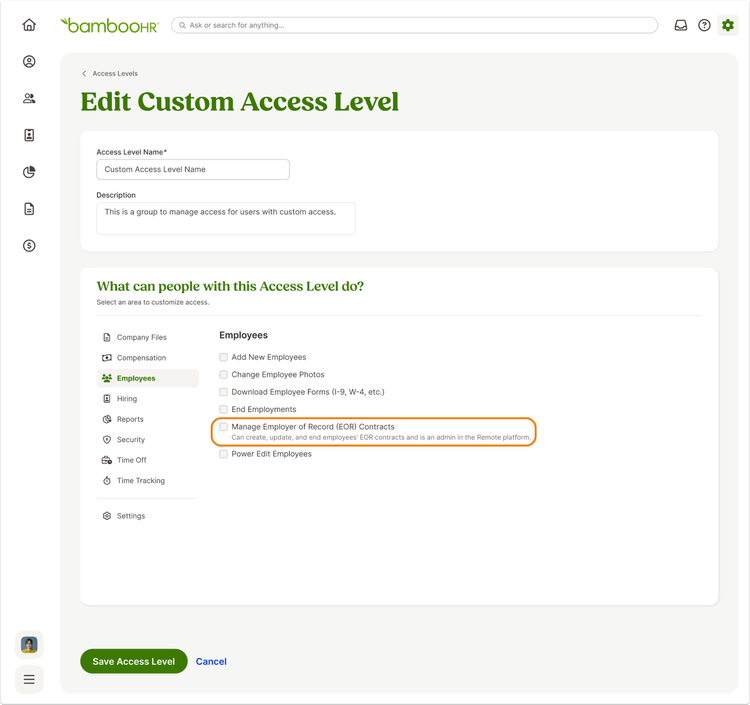
This update introduces a new permission that you can add to a custom access level once the Remote Employer of Record integration is installed. With this permission, you can give specific users the ability to manage EOR workflows without making them Full Admins in BambooHR. This change supports better role alignment across recruiting, HR, and operations teams while following internal security best practices.
Users with the Manage Employer of Record Contracts permission can create EOR contracts during global hiring, including through ATS and New Employee flows. They can also convert existing employees to EOR using the Hire Through Remote option on the employee profile. For active EOR employees, these users can view a contract status, request contract amendments, end EOR employment when they also have the End Employments permission, and copy Remote employee IDs directly from profiles.
This permission also unlocks access to the Global Employment Settings page. From there, users can view a list of EOR employees and contract statuses, use the cost calculator, access country guides, copy the Remote Company ID, and navigate to Remote using a Magic Link.
A few things stay the same. Only Full Admins can install the Remote EOR app, existing user sync behavior between BambooHR and Remote continues unchanged, and field-level permissions still control access to sensitive employee data.
As always, we love your feedback! To provide product feedback on this feature and more, head over to our product feedback page and let us know how we’re doing.