Time & Attendance Manager Team View
Get a clearer picture of your team’s workday without piecing it together yourself. Manager Team View brings real-time attendance information into one place, helping managers spot what needs attention and make faster decisions with fewer manual check-ins.
What's new
The Team View tab gives managers a live view of their hourly direct reports in Time & Attendance. The Team Pulse section summarizes current statuses, including who is clocked in, late, on break, or scheduled for PTO, alongside a daily summary that surfaces items such as break violations, late clock-ins, early clock-outs, and unscheduled clock-ins.
Insights highlight attendance patterns that may deserve attention, such as recurring late clock-ins or missed breaks, as well as consistently on-time behavior. Managers can open an insight for additional context and navigate to the employee’s timesheet when follow-up is needed.
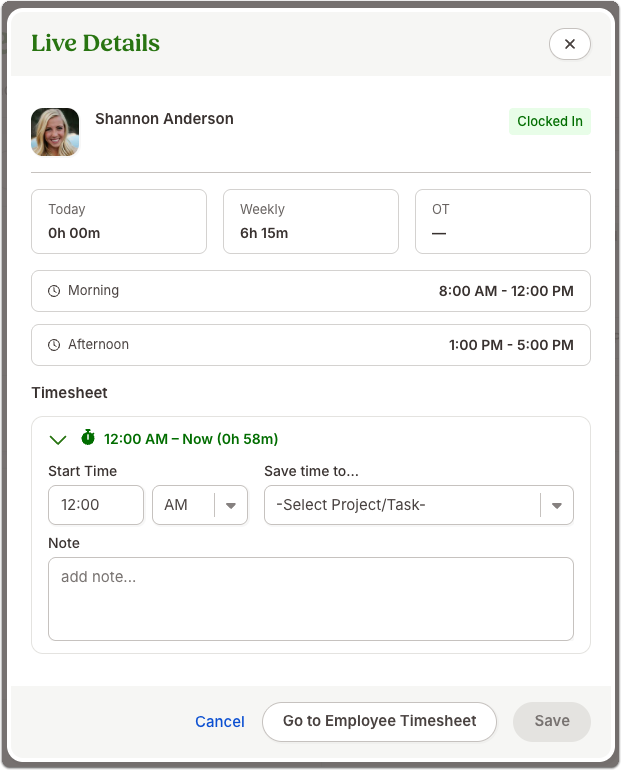
Selecting an employee’s card opens more detailed information about their workday, including clock-in details, hours worked, overtime, shift information, clock-in location and method, project or task details, and available break or shift assessments. Employees who enter time manually receive a simplified version of this experience.
As always, we love your feedback! To provide product feedback on this feature and more, head over to our product feedback page and let us know how we’re doing.