NetSuite Accounting Integration
We're excited to announce a new integration with NetSuite to provide a seamless accounting experience! This is the next step in our strategy to offer a wide range of accounting integrations for our customers. With this new partnership, you can now send your payroll journal entry (JE) reports directly to NetSuite.
Key Benefits
- Eliminate Manual Data Entry: Directly send Journal Entry reports from BambooHR to NetSuite.
- Increase Accuracy: Reduce errors that can occur with manual input.
- Save Time: You no longer need to manually download and upload JE reports.
How to Connect and Send Data
Setting up the integration is a straightforward process.
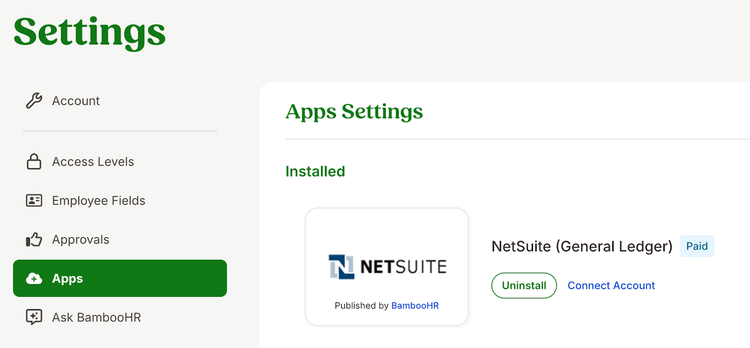
1. Install the NetSuite App: An account owner must install the NetSuite (General Ledger) app from the Settings > Apps page.
2. Connect Your Account: Once the app is installed, the payroll admin can go to Settings > Payroll > Journal Entry to connect the BambooHR payroll account with NetSuite using Merge authentication.
3. Map Accounts: Next, the account owner or payroll admin can map the payroll memo lines to the correct accounts in NetSuite’s Chart of Accounts. This user can select a report and then choose a NetSuite account to associate with each memo line.
4. Send the Report: After payroll is processed, go to Reports > Payroll Reports. A "Send to NetSuite" button will appear next to your Journal Entry report. Clicking this button will generate a preview of the report before it is sent to NetSuite.
We are excited about this new partnership and believe it will significantly enhance your payroll management experience by making your workflow simpler and more accurate.
As always, we love your feedback! To provide product feedback on this feature and more, head over to our product feedback page and let us know how we’re doing.