New Way to Expand Plan Cards
We have enhanced the enrollment experience to make plan details even easier for employees to explore. Instead of a small expand icon, employees will now be able to use a clear button labeled “Show More” within each plan card. If a plan includes a description, it will automatically show, and employees can also choose to expand all plan cards using the Expand All Plan Details option to view everything at once.
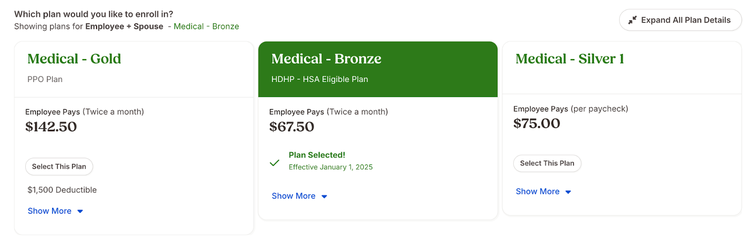
This update gives employees greater confidence as they review their benefit options and helps reduce questions for admins, making the entire benefits enrollment process smoother for everyone.
As always, we love your feedback! To provide product feedback on this feature and more, head over to our product feedback page and let us know how we’re doing.