Org Chart Shortcut
We’ve made it easier to explore your company’s structure. You can now open the org chart directly from the company directory and individual employee profiles. This update helps you quickly see where team members fit within the organization without extra navigation steps.
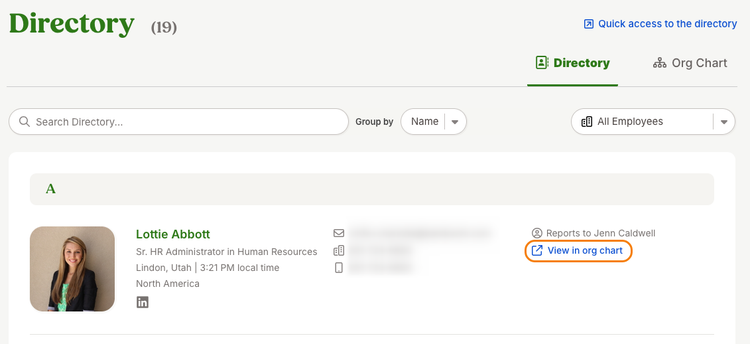
When the org chart feature is enabled, a new link “View in org chart” will appear in multiple locations across BambooHR. In the company directory, each employee’s row now includes a link that opens the org chart in a new browser tab.
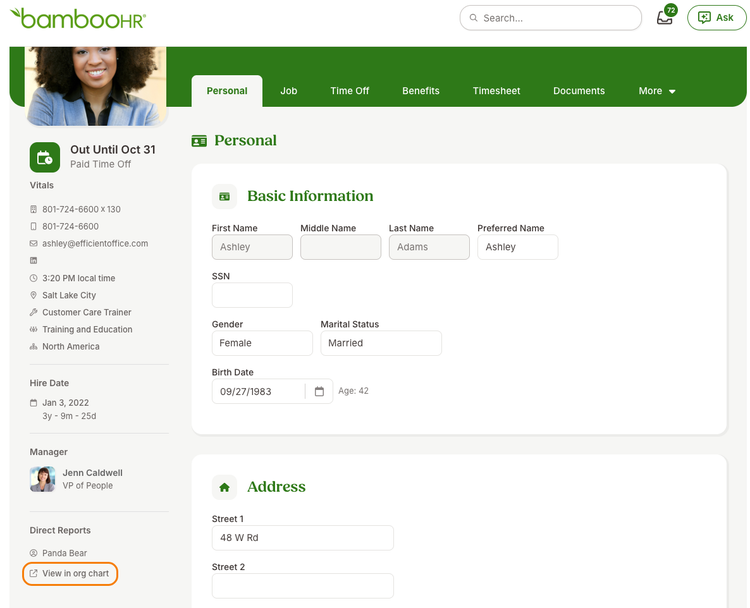
You’ll also see this link in the left margin of individual employee profiles, so you can go directly to their position in the org chart.
If you’re viewing an inactive employee profile, the org chart link will be hidden.
As always, we love your feedback! To provide product feedback on this feature and more, head over to our product feedback page and let us know how we’re doing.