Paper Check Settings and Printing in BambooHR® Payroll
We have brought paper check settings and printing directly into BambooHR, so you no longer need to log into TRAXPayroll to manage them. Payroll admins can now configure, preview, and print paper checks all in one seamless experience. We’re excited to simplify your workflow, save time, and keep payroll tasks where they belong.
Details
Many payroll teams still need paper checks for certain employees or special situations. Now, you can manage those checks without leaving BambooHR. We added a dedicated Paper Checks section within Payroll Settings, giving you full control over how your checks look and what information they include. A built-in preview updates as you adjust settings, so you can feel confident before you print.
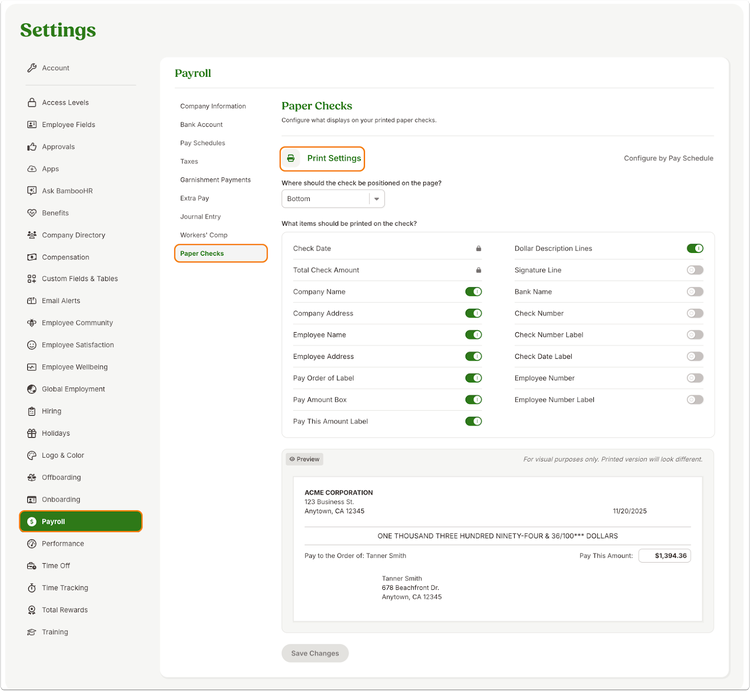
If your organization uses multiple pay schedules, you can choose to apply the same configuration across all schedules or tailor settings for each one. BambooHR makes it easy to switch between a shared setup or schedule-specific configurations, so your payroll process stays flexible as your business evolves.
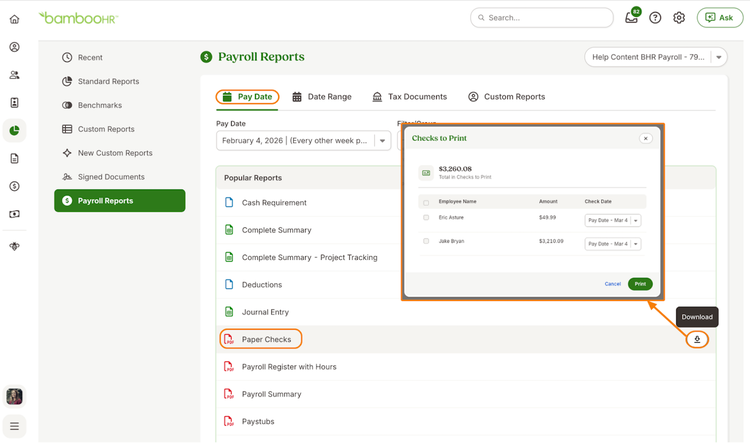
Printing paper checks is just as streamlined. You can access paper check PDFs from Payroll Reports and Payroll History, assign check numbers for a print run, select the appropriate pay date, and print in just a few clicks. If there are no paper checks for a pay cycle, BambooHR lets you know right away.
We also carried over existing configurations to ensure a smooth transition. Your current TRAXPayroll paper check settings remain intact, so you can move forward in BambooHR without extra setup. In addition, we cleaned up the paper check PDF by removing outdated or inaccurate information, helping you deliver a clearer, more professional document to employees.
As always, we love your feedback! To provide product feedback on this feature and more, head over to our product feedback page and let us know how we’re doing.