Review Payroll Faster and With More Confidence Using Payroll Assistant
Running payroll often means keeping track of one-time pay changes, comparing totals, and investigating anything that looks unusual—all before approving the final run. Bamboo AI Payroll Assistant brings that work directly into your payroll workflow by turning reminders into suggested pay actions, explaining what changed from your previous payroll, and flagging potential anomalies for review.
The result is a faster, clearer review process that helps you catch potential issues while keeping you in control of every payroll decision.
What’s new
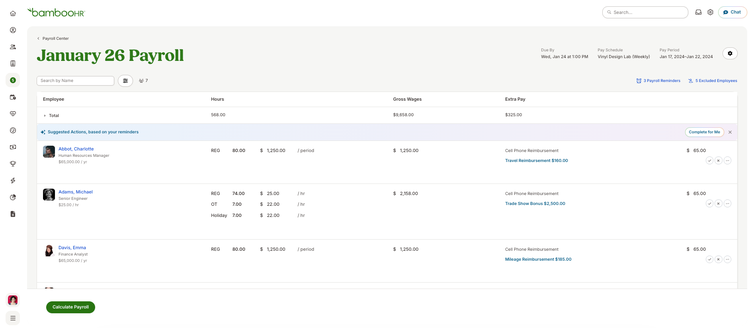
Suggested pay actions from reminders
Payroll Assistant uses your existing Payroll Reminders to draft ready-to-add pay items. When a reminder includes details such as an employee, pay type, and amount, you’ll see a suggested action that you can accept, edit, or dismiss.
Nothing is added to an employee’s pay until you approve it. Your original reminders also remain available, and anything Payroll Assistant cannot confidently interpret stays in your reminders list for you to handle.
Payroll comparisons and anomaly detection
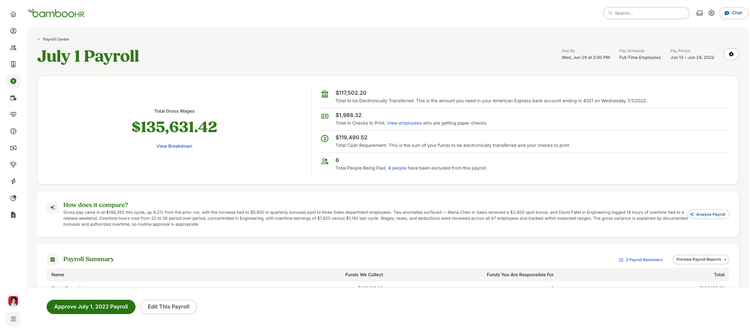
After calculating payroll, you’ll receive a comparison analysis of your current run and the previous payroll. The summary highlights key changes, explains what may be driving them, and flags potential anomalies—such as unusual overtime, one-time bonuses, or unexpected changes tied to an employee or department.
Payroll Assistant reviews areas including gross and net wages, taxes, deductions, employee count, overtime, and bonus-related pay. The comparison is designed to support your review; it does not change payroll information or approve the run for you.
What you’ll see
After selecting Start Payroll, a new suggested actions section displays pay items drafted from your reminders. From there, you can accept, edit, or dismiss each suggestion before it is added to the payroll run.
Once payroll is calculated, a How does it compare? section appears below your payroll totals. This summary explains how the current payroll differs from the previous run, identifies the primary reasons for those changes, and calls attention to anything that may need a closer look.
What you can do
Review suggested pay actions and decide which ones should be included in the payroll run. You can make changes to a suggestion before accepting it or dismiss anything that does not apply.
Before approving payroll, review the comparison summary to quickly understand significant changes and investigate potential anomalies. Payroll Assistant handles more of the manual review work while you retain control over every pay item, calculation, and approval.
Your feedback directly informs the development of this feature. Select the AI Beta badge in BambooHR, choose thumbs up or thumbs down, and then select Share feedback to tell us about your experience.