Qualified Over Time in BambooHR Time Tracking
Qualified overtime is now easier to track and report without changing how your team logs time. Time Tracking automatically calculates and stores Qualified Overtime hours for US-based employees, so you have the right totals ready for downstream payroll and year-end needs.
What's new
Time Tracking now supports a new hour type called Qualified Overtime (QOT), calculated based on FLSA weekly rules, so employers can identify hours worked over 40 in a single FLSA work week. This runs alongside your existing regular hours and overtime metrics, so your current pay and time workflows stay intact.
You can also bring Qualified Overtime into BambooHR through the Hours Importer using a new “Qualified OT Hours” column, making it easy to load corrections or catch-up data when needed.
What you'll see
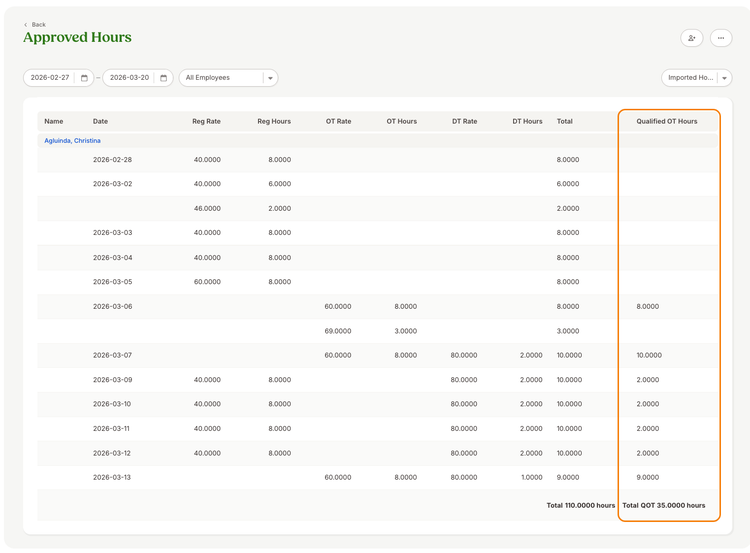
In the Approved Hours report, you’ll see a new “Qualified OT Hours” column added alongside your existing totals. Qualified overtime totals appear separately (as “Total QOT”) instead of rolling into the main Total column, so it’s clear what’s qualified versus overall approved time.
After importing, the import results view will also display the Qualified OT Hours data so you can confirm what was loaded.
Look at earlier pay periods from this year, and you will see the QOT hours calculated in the Approved Hours report.
What you can do
Review the Approved Hours report to see Qualified Overtime totals by employee and time period. If you already track qualified overtime elsewhere, use the Hours Importer to load Qualified OT Hours alongside worked time or as a standalone correction.
As always, we love your feedback! To provide product feedback on this feature and more, head over to our product feedback page and let us know how we’re doing.