Remote IDs in BambooHR
If you are using the Employer of Record integration in BambooHR, you can now access your Remote Company ID and individual Remote Employee IDs right in BambooHR.
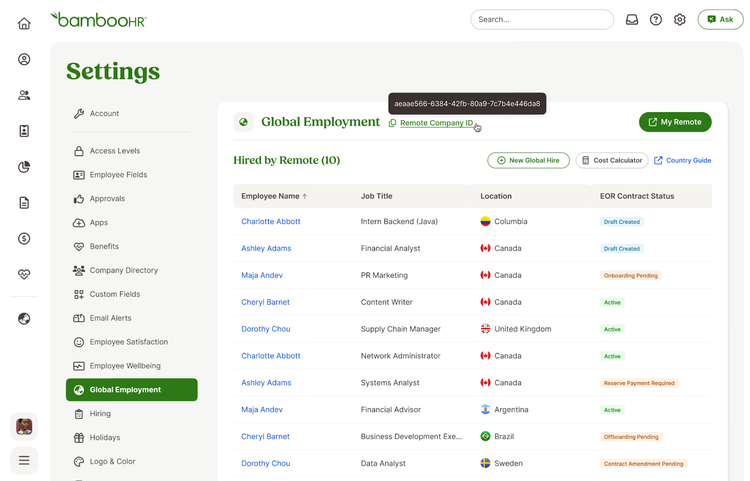
The Remote Company ID will be accessible in Settings > Global Employment. You can hover your cursor over Remote Company ID to view the ID, or click to copy it to your clipboard.
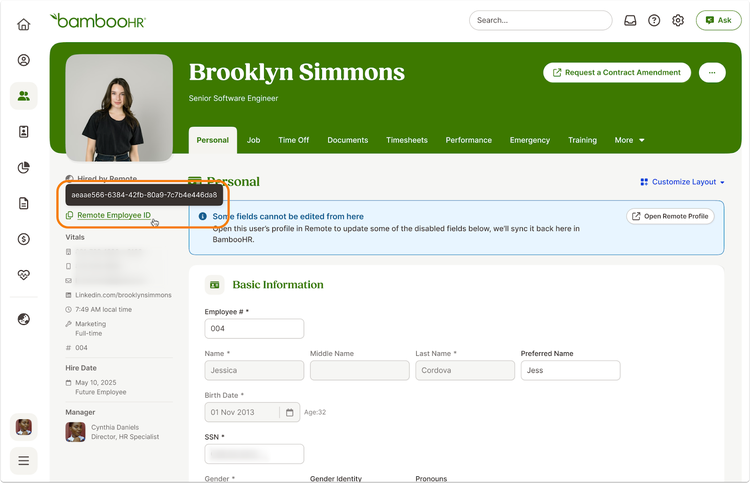
You can access the Remote Employee ID by navigating to an employee’s profile. The ID will be in the left menu under ‘Hired by Remote’. You can hover your cursor over Remote Employee ID to view the ID, or click to copy it to your clipboard.
As always, we love your feedback! To provide product feedback on this feature and more, head over to our product feedback page and let us know how we’re doing.