New Sage Intacct Accounting Integration
Overview
We’re excited to introduce the new Sage Intacct integration for BambooHR Payroll. This update helps you save time and reduce manual data entry by sending payroll journal entry (JE) reports directly from BambooHR to Sage Intacct. With a few quick setup steps, your payroll transactions will sync seamlessly to your accounting software, so you can close your books faster and more accurately.
Details
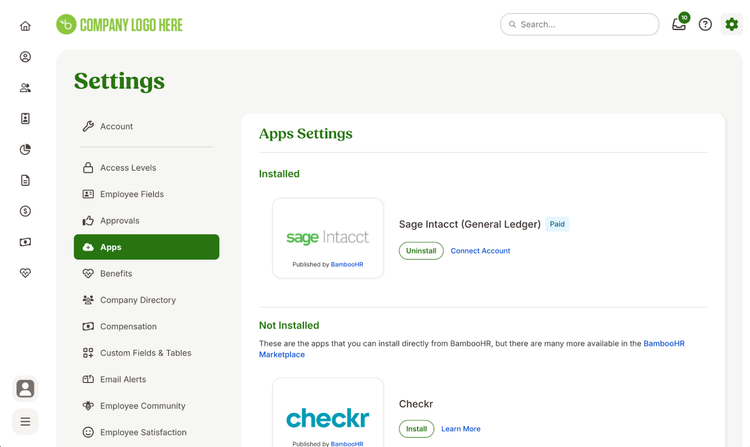
With this integration, account owners can install the Sage Intacct (General Ledger) app directly from the Settings > Apps page in BambooHR. Once installed, Payroll Admins can connect to their Sage Intacct account using Merge authentication and map their payroll memo lines to Sage Intacct’s Chart of Accounts.
After payroll is processed, users can send JE reports to Sage Intacct with one click from the Reports > Payroll Reports page. A preview appears before sending, allowing you to review and confirm all account mappings. The system will also alert you if any memo lines are unmapped, ensuring accuracy every time.
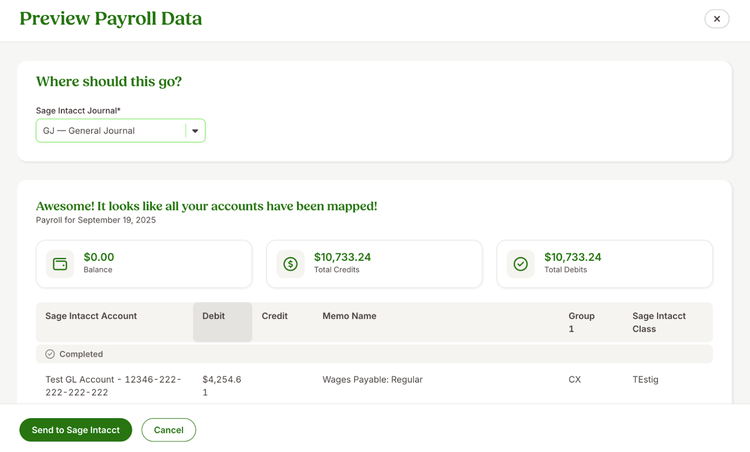
To make reporting more flexible, you can also map payroll data by segments such as department, project, or location, using Sage Intacct’s class setup. Once configured, these classes will automatically appear in your payroll data preview before sending.
This integration eliminates manual uploads, increases accuracy, and helps your team spend less time on accounting tasks. It’s designed to give you a more efficient, reliable payroll-to-accounting workflow all within BambooHR.
As always, we love your feedback! To provide product feedback on this feature and more, head over to our product feedback page and let us know how we’re doing.