Schedule Printing in Time & Attendance
Managers and schedule administrators can now generate a clean, printable version of a schedule, making it simpler to share upcoming shifts, post schedules for teams, and maintain records without extra formatting or manual work.
What's new
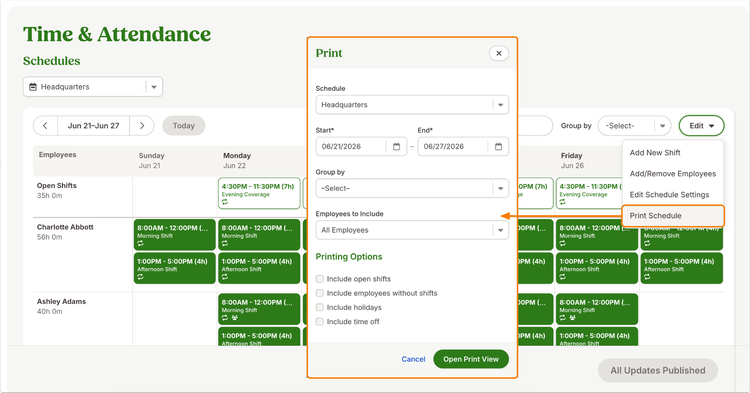
Schedule Printing lets you create a printer-friendly schedule view and save it as a PDF for sharing or record-keeping. You can choose a schedule, select a date range, and customize which information appears before generating the print view.
You can also narrow the output to specific employees, group employees by organizational attributes such as department or location, and choose whether to include items like open shifts, holidays, and time off. This helps create clearer schedules for different audiences and use cases.
What you'll see
A new Print option is available from the schedule page. Selecting it opens a dialog where you can choose filters and generate a dedicated print view in a new browser tab. The resulting schedule is displayed in a clean table format with employees listed by row and days displayed by column for easy reading and sharing.
What you can do
Generate schedule PDFs for managers, employees, or team locations without recreating information manually. Use filters to focus on specific employees or schedule groups, include important details like time off and holidays when needed, and save schedule records for future reference.
As always, we love your feedback! To provide product feedback on this feature and more, head over to our product feedback page and let us know how we’re doing.