Search Time & Attendance Schedules
Finding the right person or shift in a busy schedule just got faster. Managers and admins can now search the scheduling grid in real time, so they can quickly narrow the view and focus on the rows that matter most.
What's new
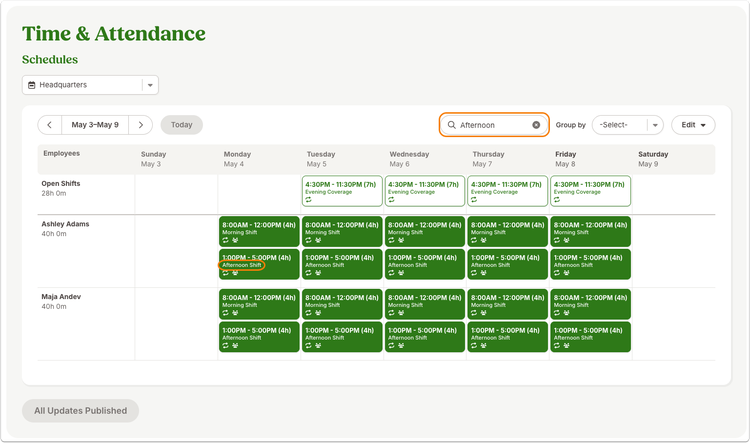
The scheduling grid now includes a search field at the top of the page. As you type, the grid automatically filters to show matching employee rows or shifts, helping teams move through schedule reviews with less scanning and fewer interruptions.
Search supports employee names, including first name, last name, full name, and partial matches. It also supports shift names, making it easier to find everyone assigned to a specific shift in the current schedule view.
What you can do
Use the new search field to quickly find a specific employee, review who is assigned to a named shift, or narrow a large schedule view before making updates. Clearing the field returns the grid to the full current view.
As always, we love your feedback! To provide product feedback on this feature and more, head over to our product feedback page and let us know how we’re doing.