Choose Benefits with More Confidence Using Self-Enrollment Guide
Enrolling in benefits often means reading dense plan descriptions full of unfamiliar terms, or reaching out to HR just to understand the difference between two plans. Self-Enrollment Guide brings clarity directly into the enrollment wizard by generating plain-language summaries on each plan card, explaining what a plan covers and why an employee might choose it.
The result is a clearer, more confident enrollment experience that helps employees understand their options while keeping the final decision in their hands.
What’s new
Plain-language plan summaries
Self-Enrollment Guide generates a short summary on each plan card as employees move through enrollment. Each summary includes a headline and a plain-language explanation of what the plan covers and reasons someone might prefer it, such as lower cost, broader network, or higher coverage limits. Summaries use typical use case framing. They describe general scenarios, like the kind of employee who tends to prefer a certain plan, rather than telling any individual employee what to pick. The employee still reviews their options and makes their own selection.
Built for every plan type
For coverage-amount plans like life insurance, AD&D, and critical illness, summaries explain why the coverage matters and what to consider when choosing an amount. For contribution-based accounts like HSA, FSA, and 401k, summaries explain the tax advantages and key rules, such as employer match thresholds or use-it-or-lose-it timing.
What you’ll see
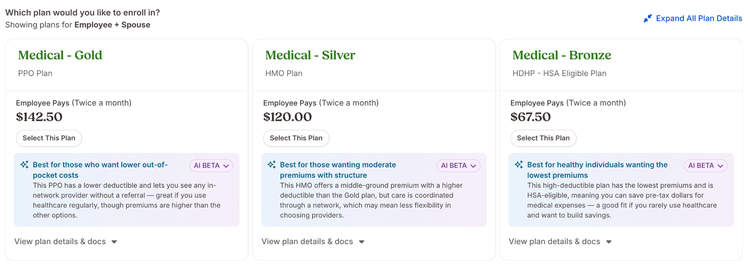
As employees move through each step of the self-enrollment wizard, a summary appears on every plan card, marked with a sparkles icon. Loading bars show briefly while the summary generates. Summaries do not appear on waived cards, and plan descriptions and attachments are hidden on collapsed cards since the summary now serves as the primary explanation.
If an employee navigates back to a previous step within the same session, the summaries they already saw remain in place without regenerating. If an employee exits enrollment and returns later, fresh summaries are generated for each step they visit.
If summary generation is temporarily unavailable, plan cards display normally with all standard details. Enrollment is never blocked by summary availability.
What you can do
Read the AI-generated summary on each plan card to understand what a plan covers and who it tends to suit before making a selection. Self-Enrollment Guide does not make recommendations or submit elections. Employees review their own options and choose the plan that fits, with a clearer starting point than a dense plan document alone.
Have feedback about Self-Enrollment Guide? Share it through our product feedback page. We'd love to hear how the experience is working for you.