Shift Scheduling Data in Custom Reports
Building scheduling reports just got easier. You can now report on scheduling and shift data using custom reports, making it easier to monitor staffing, identify coverage gaps, track compliance, and analyze labor trends without exporting data or combining information manually.
What's new
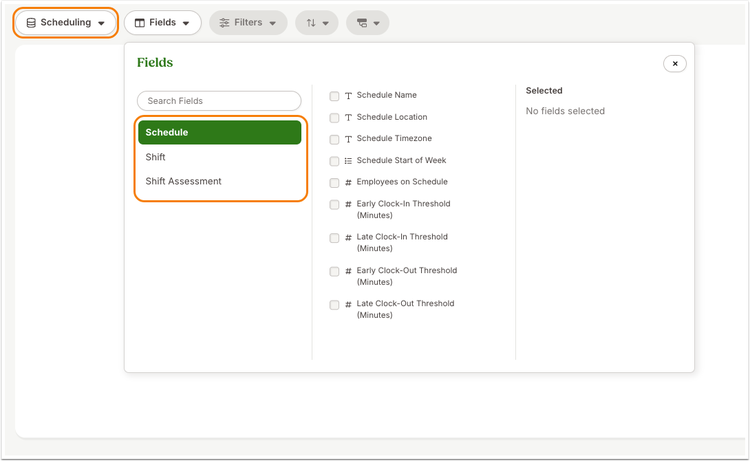
Custom Report Builder now includes a new Scheduling dataset with schedule configuration, shift details, and coverage information, giving you the flexibility to build reports around staffing, scheduled labor hours, cancelled shifts, and more.
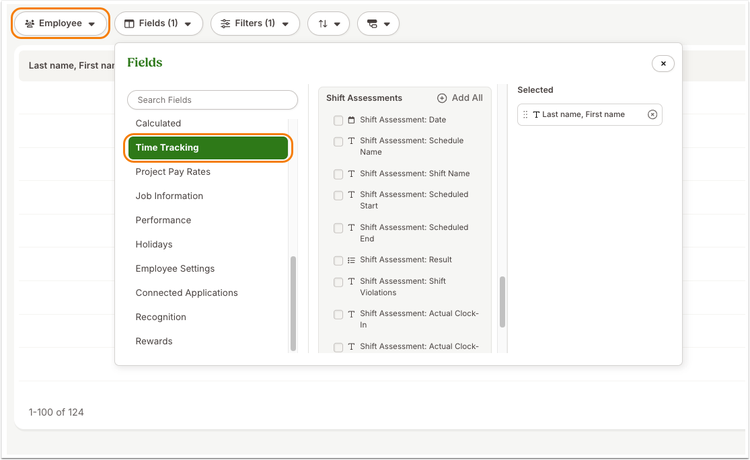
You'll also find new Shift Assessment fields within the existing Employee dataset. These fields make it easy to report on shift compliance, including missed shifts, late arrivals, early departures, unscheduled work, and other shift exceptions so you can quickly spot trends and take action.
Together, these reporting options let you filter, group, sort, and export scheduling data to create reports that fit your organization's operational and compliance needs.
What you'll see
When building a custom report, you'll notice a new Scheduling dataset alongside your existing report datasets. Within the Employee dataset, you'll also see a new Shift Assessment field group that includes shift compliance and violation information.
What you can do
Take a look at the Custom Reports tab and explore the new dataset option. See just how easy it is to monitor employee scheduling data.
As always, we love your feedback! To provide product feedback on this feature and more, head over to our product feedback page and let us know how we’re doing.