Stay Ahead of EasyLlama Training Retirements
Keeping training up to date just got easier. BambooHR now helps you identify EasyLlama courses that are retiring or have already reached end of life, making it easier to replace them before training is disrupted. These updates give administrators more visibility into upcoming changes while helping employees stay on track with required learning.
What's new
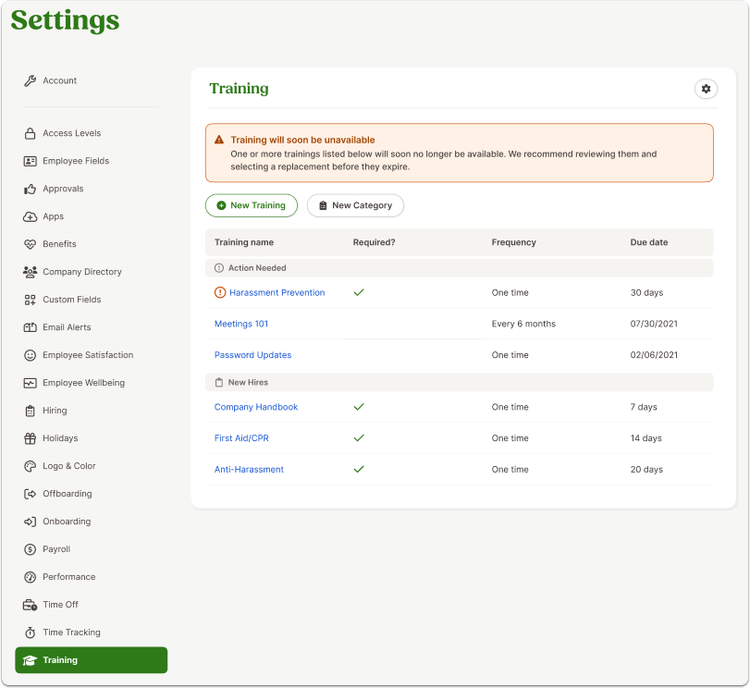
When an EasyLlama course is scheduled to retire soon, or is no longer available, it now appears at the top of the Training settings page in a dedicated Action Needed section. Clear in-product messages and warning indicators help you quickly identify affected courses and take action before they impact employees.
Replacing a retired course is also more streamlined. You can open the affected training, browse or search the EasyLlama course library, filter available courses by topic, industry, or region, and choose a replacement. If the course has already reached end of life, the replacement becomes the active assignment after you save. If the course is retiring soon, you can schedule its replacement in advance so it automatically takes over when the current course is retired.
Employees also receive a clearer experience when courses reach end of life. Employees who already started a course before it was retired can continue and complete it. If they haven't started the course, they'll see a message explaining that the training is no longer available and that their HR administrator will provide the next steps. For completed retired courses, certificates remain available even though the course image is no longer displayed.
What you'll see
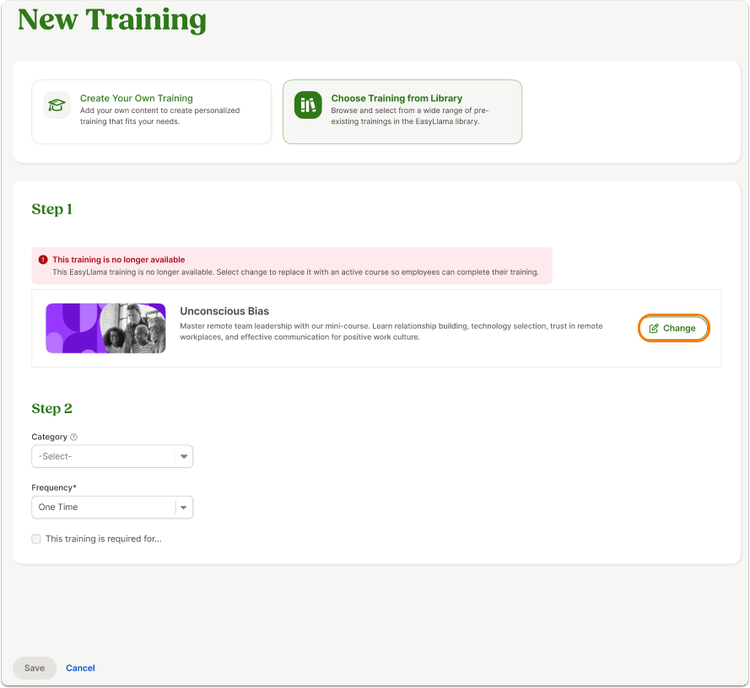
You'll notice new notifications and warning icons throughout the EasyLlama training management experience, along with clear messaging when a course is approaching retirement or has already been retired. When replacing a course, you'll also see an updated training selection experience with searchable and filterable replacement options.
What you can do
Review any courses listed under Action Needed, select replacement training when prompted, and save your changes. For courses scheduled to retire, you can choose a replacement ahead of time so the transition happens automatically when the current course reaches end of life.
As always, we love your feedback! To provide product feedback on this feature and more, head over to our product feedback page and let us know how we’re doing.