Streamlined Dependent Creation
Adding dependents just got a little easier and more accurate. To help prevent benefits enrollment issues, BambooHR now checks for duplicate Social Security Numbers (SSNs) when dependents are added or updated, helping catch data entry mistakes before they create downstream problems.
What's new
When entering a dependent's SSN, BambooHR now validates that the number is unique within the household. If the SSN matches the employee's SSN or another dependent's SSN, you will see an error message and will not be able to save until the value is corrected or removed.
Dependent SSNs remain optional. If you do not have a dependent's SSN available, you can continue leaving the field blank.
What you'll see
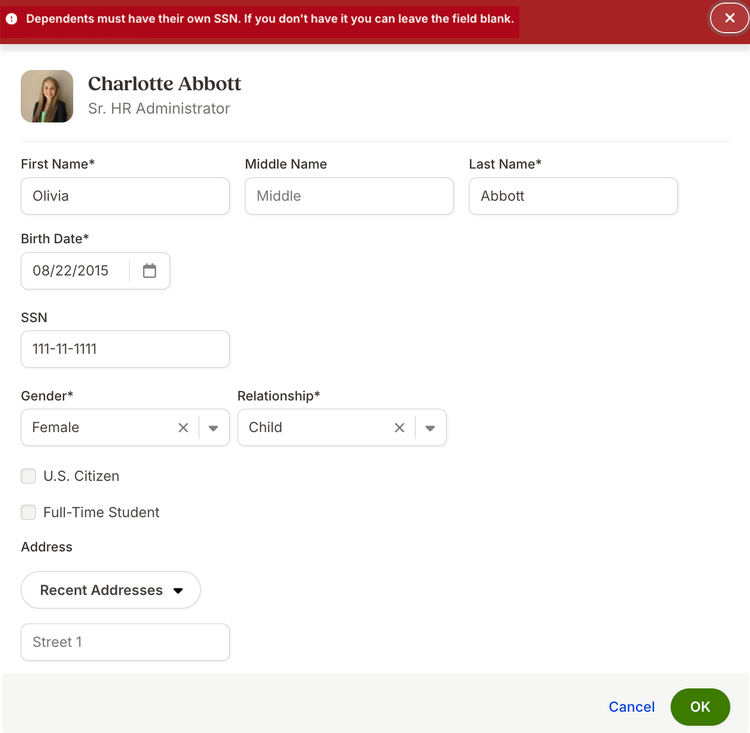
The dependent form will look largely the same. The main change is a clear error message that appears when a duplicate SSN is entered.
What you can do
Review your process for adding dependents and continue entering SSNs when they are available. If a dependent's SSN is not available, simply leave the field blank and save as usual.
As always, we love your feedback! To provide product feedback on this feature and more, head over to our product feedback page and let us know how we’re doing.