Time & Attendance Team View List Layout
Get a clearer picture of your team's time and attendance with the new list view in BambooHR. This flexible layout makes it easy to scan employee statuses, review hours worked, and find the information you need in a format that works best for you.
What's new
You now have two ways to view your team in Time & Attendance. Switch between the grid view and the new list view using the toggle at the top of Team View.
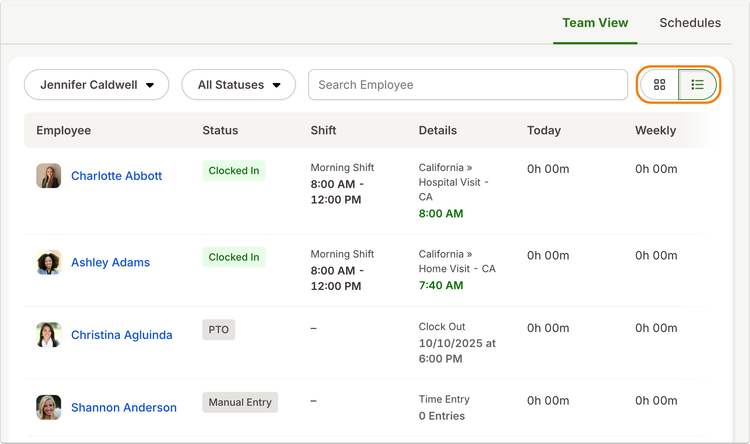
The list view organizes employee information into easy-to-scan rows, giving you a clear look at who's clocked in, who's on break, scheduled shifts, and hours worked today and throughout the week. Both layouts display the same information, so you can choose the one that works best for you without losing any details.
BambooHR also remembers your preferred layout. The next time you return to Team View, your selected view will be ready to go.
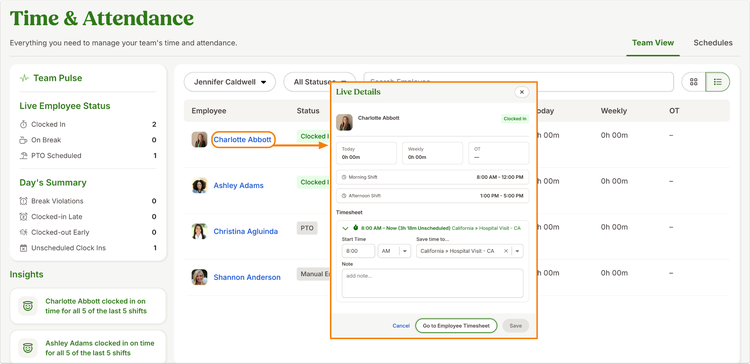
Need a closer look at an employee's time? Select their name in the list to open the familiar Live Details window, where you can review their time and attendance information without navigating away from your team overview.
As always, we love your feedback! To provide product feedback on this feature and more, head over to our product feedback page and let us know how we’re doing. Happy Bambooing!